


AI, AI agents in architecture and the AI revolution: agents transforming design for the architecture firm
AI is changing how an architecture firm manages early design work, coordination and decision making. First, define terms. Artificial intelligence refers to software that finds patterns, predicts outcomes and maps options. An AI agent is a software entity that acts on behalf of a user or system. Agentic AI describes systems that plan and act with some autonomy. These distinctions matter for procurement and governance.
Why adopt AI agents in an architecture practice? For one, adoption is already high. A recent survey reports that approximately 79% of businesses use AI agents, and many quantify gains in productivity and cost savings 79% of businesses use AI agents. For design teams, case studies show that generative and algorithmic tools can cut early iteration time by 20–30% in firms that adopt them reductions in early design iteration times. These savings free architects to focus on higher‑value creative design.
Examples ground the case. Tools like Autodesk Spacemaker automate site optimisation and massing studies. Research on multi-agent systems in AEC demonstrates how coordinated agents can manage constraints, scheduling and compliance at scale multi-agent systems in AEC. In practice, an AI agent may run dozens of massing studies overnight. Then stakeholders inspect shortlisted solutions. The result: more design possibilities and faster feedback.
Strategically, leaders should view agents transforming practice as partners, not replacements. As Patrick McGuinness notes, “The deployment of AI agents in architecture is not just about automation; it’s about creating collaborative partners that enhance human creativity and problem‑solving capabilities.” Patrick McGuinness on AI agents. That perspective helps firms balance risk, governance and adoption.
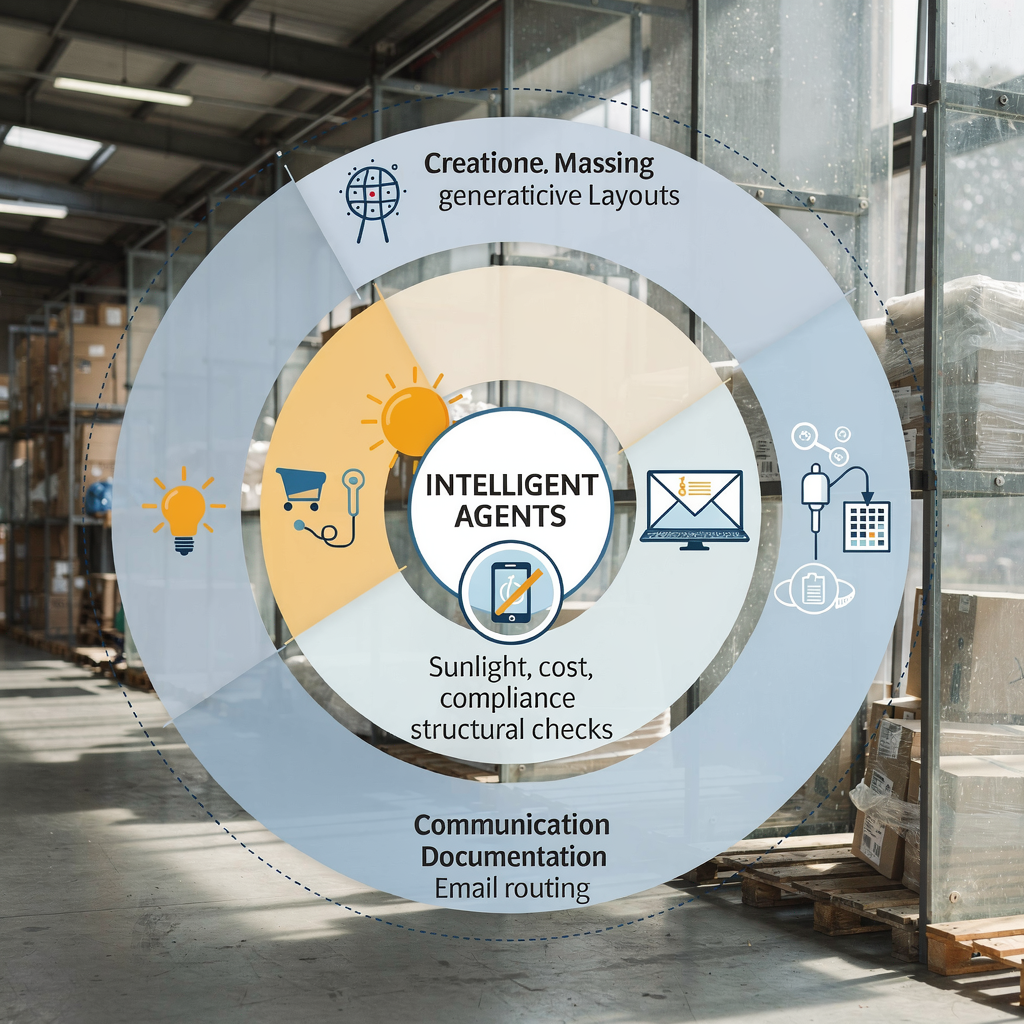
To integrate AI, firms must map which tasks an AI agent can take on, and which require human sign‑off. That mapping drives procurement, training and software integration strategies. For architects, this first step keeps adoption focused and measurable. It also frames how agentic AI supports the future of architecture without undermining practice control.
How an AI agent and architectural AI can generate schematic design and automate early options
Schematic design benefits quickly from generative design and architectural AI. In this workflow, an AI agent ingests constraints and project requirements, then generates many schematic proposals. Inputs may include site geometry, program lists, daylight targets and cost limits. The agent runs parametric rules and returns multiple design options along with quantitative metrics. This process reduces repetitive tasks in option making and allows architects to evaluate tradeoffs rapidly.
Workflow: inputs → agent generation → evaluation → selection. First, the architect defines constraints and priorities. Next, the agent uses generative design kernels to generate hundreds of massing variants. Then analytic agents run sun, wind and cost checks. Finally, the team selects and refines a short list. The agent can also produce a quick presentation pack for clients.
Large language models and tuned models translate a written brief into initial layouts. Research shows that combining LLMs with BIM data produces coherent initial schemes and tagged BIM elements, which accelerates schematic design hand‑offs to engineers LLMs + BIM research. Tools like Spacemaker already quantify daylight, view and site fit, giving architects measurable feedback across options site optimisation examples.
Before/after example. Before: a small team manually sketches 12 options across two weeks. After: an AI agent generates 120 massing options overnight. The team reviews 8 shortlisted proposals the next morning, with sunlight and cost scores attached. The agent saved iteration time and raised design exploration breadth. In short, generative ai helps architects make informed design choices faster, and it enables architects to focus critique where their expertise matters most.
This approach needs checks. Agents must respect building codes and client constraints. A design assistant should flag uncertain assumptions. For schematic design, human oversight prevents model drift and preserves design intent. Still, with good governance, architectural AI can automate many early tasks and deliver multiple design options based on objective metrics.
Drowning in emails?
Here’s your way out
Save hours every day as AI Agents label and draft emails directly in Outlook or Gmail, giving your team more time to focus on high-value work.
AI-powered use case catalogue: top AI, ai tool examples and building information modeling workflows
Here is a compact catalogue of practical AI-powered use cases that plug into building information modeling and project workflows. Each entry shows a short pro, con and maturity level.
1) Rapid massing and site studies — pro: fast exploration and data‑backed tradeoffs. con: needs accurate site constraints. maturity: production. Tools like Autodesk Spacemaker show this at scale.
2) Automated code compliance checks — pro: saves review time and reduces errors. con: local code parsing can be brittle. maturity: early production. This use case pairs agents with rule engines and BIM geometry.
3) Cost estimation from BIM — pro: early cost certainty. con: needs cost databases and updates. maturity: pilot. An ai agent can extract quantities and map rates quickly.
4) Clash detection and coordination — pro: faster coordination between disciplines. con: requires clean models. maturity: production. Integrated agents spot collisions and suggest resolutions.
5) Documentation automation — pro: reduces repetitive tasks and inconsistent notes. con: quality control needed. maturity: production. For example, an ai‑powered email draft and document fill system speeds project correspondence; firms with heavy ERP and email workflows can use platforms that automate the full lifecycle of operational email to reduce handling time automated correspondence.
6) Client presentations and visuals — pro: fast options and annotated rationale. con: may need aesthetic tuning. maturity: production. Agents produce annotated boards from selected schemes.
7) Scheduling and resource planning agent — pro: links design changes to delivery timelines. con: needs integration with ERP. maturity: pilot. This use case benefits from plugins and APIs that connect schedule data.
8) Email and procurement automation — pro: reduces operational email load. con: governance for approvals. maturity: production. Firms can integrate ERP‑grounded email automation for queries to subcontractors and suppliers, which streamlines admin and improves traceability ERP email automation.
9) Sketch‑to‑BIM pipelines — pro: accelerates model creation from hand drawings. con: quality depends on sketch clarity. maturity: early production.
10) Code‑checking agents trained on local regulations — pro: specialist legal checks. con: requires localisation. maturity: pilot.
These practical use cases show how ai systems complement design software. The top ai categories are generative design, code‑checking agents, scheduling agents and documentation automation. Each use case maps to building information modeling workflows and to project workflows across design, delivery and operations.
Agent workflows and AI agent architecture: integrate agentic AI with software development and building information modeling to streamline delivery
Designing agent workflows requires thinking like a software architect. Begin with a modular ai agent architecture that separates responsibilities. Use specialised intelligent agents for design, cost and compliance. A multi‑agent system coordinates these components and resolves conflicts. APIs and plugins link agents to BIM servers and design software. This split reduces coupling and supports versioning.
Recommended architecture: a central orchestration layer, design agents, analytic agents, communication agents, and a human‑in‑the‑loop review panel. Agents communicate through a model context protocol and a shared BIM data store. This approach echoes recent multi‑agent BIM automation research and AutoGen‑style coordination frameworks AgentAI survey and coordination. The orchestration layer enforces access control, logging and audit trails.
Key software architecture practices: API first design, granular permissions, data versioning and repeatable CI/CD for model updates. A model context protocol standardises how agents describe assumptions. Version control prevents regressions when a cost agent or a compliance agent updates logic. Include test suites that validate agents against known scenarios before deployment.
Security and governance are essential. Agents must authenticate to BIM servers and only access allowed datasets. The IT checklist should include encryption at rest, role‑based access control, and model audit logs. Also, define human sign‑off gates: design changes above a threshold require partner approval.
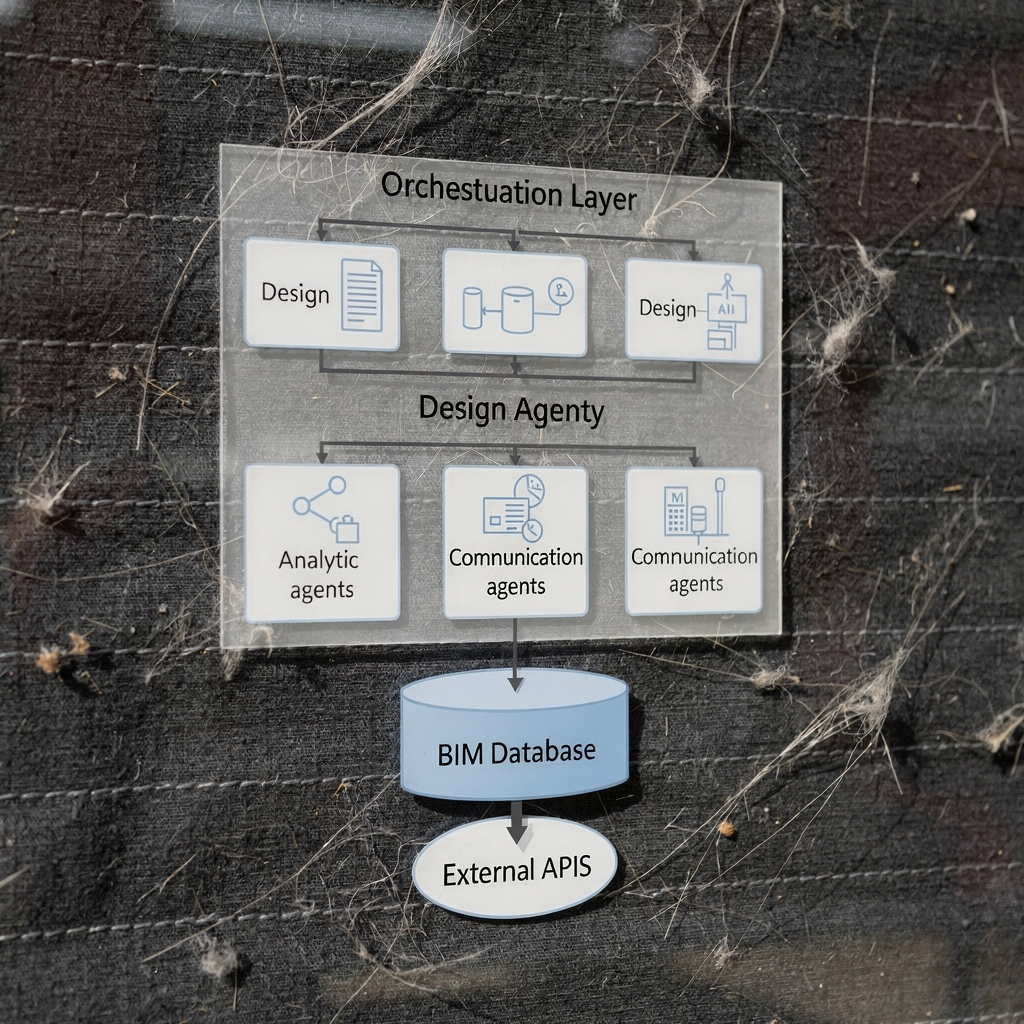
Practical checklist for IT teams:
– Define agent workflows and responsibilities. – Establish APIs and plugin points for Revit and other design software. – Implement data governance and access rules. – Create model versioning and validation pipelines. – Plan human‑in‑the‑loop controls and audit trails. – Monitor agent performance and drift.
Tools and integrations matter. Revit plugins, BIM server APIs and middleware allow agents to read and write BIM content. This setup enables architects and engineers to keep control while letting agents automate repetitive tasks. Firms can therefore deploy AI agents that scale without disrupting delivery and while preserving accountability.
Drowning in emails?
Here’s your way out
Save hours every day as AI Agents label and draft emails directly in Outlook or Gmail, giving your team more time to focus on high-value work.
Benefits of AI, automation and how AI helps architects: measurable impacts and risks to manage
Benefits of AI in practice include faster iterations, broader exploration of design possibilities, reduced administrative load and earlier cost certainty. Case evidence shows measurable productivity gains where agents reduce manual iteration time by 20–30% iteration reductions. A PwC survey also reports that two‑thirds of firms using agents can quantify tangible benefits such as improved productivity and cost savings PwC survey findings. These figures help build an ROI case for adoption.
Simple ROI model. Estimate hours saved per project, convert to salary cost saved, subtract implementation costs and ongoing licensing. For example, if an ai agent saves 40 hours at a loaded rate of $100 per hour, that is $4,000 per project. Multiply by annual project count to estimate payback.
Major risks require mitigation. Biased training data can produce skewed results. Model drift reduces reliability over time. Regulatory non‑compliance is a legal exposure. IP and liability issues arise when models produce construction details. Occupational changes affect staffing and skills. Controls include governance, audits, and human sign‑off. Maintain a risk register and run periodic bias and safety audits.
Risk‑register template (short): risk name, likelihood, impact, owner, mitigation, monitoring cadence. Example risks: biased site suitability scoring, incorrect cost mapping, outdated code logic. Owners must monitor agent outputs and apply corrective training or rule updates.
Operationally, intelligent automation can free architects to focus on higher‑value creative design. Agents handle repetitive tasks, while architects keep creative control. To benefit, firms should invest in data hygiene, version control and staff training. With those steps, the benefits of ai outweigh the risks in many projects.
For firms that handle high email volumes with operational data across ERP or SharePoint, automated email agents provide measurable efficiency gains in parallel. virtualworkforce.ai automates operational email lifecycles, reduces handling time and improves traceability, which can be useful for project communication and procurement workflows learn about scaling with AI agents.
From pilot to scale: steps to automate, transform your architecture and adopt agents transforming project delivery
Start small and scale deliberately. The roadmap below helps architecture teams deploy agents without disrupting delivery.
Step 1: identify high‑value use cases. Pick 2–3 quick wins such as automated documentation, design‑option generation and code checks. Step 2: run small pilots with clear KPIs. Measure time saved, options generated and error rate. Step 3: integrate successful pilots into BIM and practice management via APIs and plugins. Step 4: train staff and standardise best practices. Step 5: monitor, iterate and scale across offices.
Quick wins: automated document drafting, rapid schematic design generation, and automated code checks. Medium term: integrated agent workflows that coordinate schedule and cost. Long term: agentic systems that act as collaborative partners and offer contextual recommendations in real‑time.
Implementation checklist (one page): define objectives; map current workflow; select vendors and ai tool functions; run pilot; implement governance and training; integrate with BIM and ERP; measure KPIs; roll out. Suggested KPIs: time saved per task, number of multiple design options generated, percent reduction in manual clashes, stakeholder satisfaction and error rate.
Governance and training matter. Create internal standards for model updates, human sign‑off thresholds and data retention. Deploy monitoring to track model drift and performance. Also, plan change management to help architects to focus on design rather than admin tasks.
Finally, prepare to scale the technology stack. A repeatable software development and integration approach reduces risk. Document the ai agent framework and software architecture for future teams. By following these steps, firms can deploy autonomous agents safely, capture benefits and transform project delivery over time.
FAQ
What is the difference between AI and an AI agent?
AI refers to algorithms and models that process data, predict outcomes and recognise patterns. An AI agent is a software entity that acts, plans or makes decisions on behalf of a user or system.
How do AI agents generate schematic design options?
Agents ingest constraints, site data and program requirements, then run parametric and generative design routines. They return multiple design options with performance metrics for daylight, cost and area.
Are AI agents safe to use for code compliance checks?
They can accelerate checks but need localisation and validation. Human review remains essential, and firms should run pilots and audits before full reliance.
Can AI integrate with existing BIM tools like Revit?
Yes. Agents connect via APIs and plugins to BIM servers. Proper integration requires data governance, version control and test suites to validate outputs.
What benefits of AI can architects expect first?
Expect faster iterations, more design possibilities and reduced admin work. Many firms report clear time savings in early stages and improved coordination.
How do you measure ROI for AI in architecture?
Estimate hours saved per task, multiply by hourly costs and compare to implementation costs. Track KPIs like time saved, options generated and error rates.
What are the main risks when deploying agents?
Risks include biased data, model drift, regulatory gaps, IP exposure and reliance without human oversight. Mitigate with governance, audits and sign‑off rules.
How does an architecture firm start a pilot?
Identify a single use case, define KPIs, set up a small team and run a time‑boxed pilot. Use the pilot to validate value and refine integration requirements.
Can AI agents help with project emails and procurement?
Yes. Agents can route, draft and resolve operational emails tied to project systems. Solutions exist that automate the full email lifecycle for project operations, improving speed and traceability.
Where can I learn more about multi‑agent research for AEC?
Look to recent surveys and ACM publications on multi‑agent systems in AEC and AgentAI reviews. These resources explain coordination frameworks and agentic system design in depth multi-agent AEC research.
Drowning in emails?
Here’s your way out
Save hours every day as AI Agents label and draft emails directly in Outlook or Gmail, giving your team more time to focus on high-value work.