


AI email assistant for supply chain and logistics teams: what it does and why it matters
An AI email assistant is a purpose-built tool that reads, classifies, and acts on messages that drive supply chain work. For logistics teams it handles inbound requests about orders, ETA changes, inventory levels and exceptions. It parses inbound emails to extract PO numbers, tracking IDs and quantities. It auto-tags messages by order or shipment and links threads to purchase orders. As a result, teams cut email handling time and reduce errors. Studies report typical reductions in email handling time between 30–50% (40–50% time saved) and up to 30% gains in communication efficiency (30% efficiency).
Why this matters for supply chain management is simple. Timely, accurate communication drives on‑time delivery, fewer stockouts and lower expedited freight costs. Data shows a measurable improvement in on‑time delivery of roughly 15–20% after AI-driven inbox workflows are introduced (15–20% on‑time delivery). Automated triage speeds issue resolution too; some pilots report about 20% faster resolution of shipment exceptions.
Consider a before/after logistics team workflow. Before: a shared inbox receives hundreds of messages. Staff read threads, search an ERP for order status, then route or reply. This creates delays, duplicated work and email chaos. After a pilot with an AI assistant: messages are labelled automatically, urgent ones bubble up, PO links appear in the thread and the assistant suggests a reply grounded in operational data. Teams then let staff focus on exceptions and high-value tasks. For many organizations, the transition reduces repetitive tasks and lets planners focus on strategic decisions. If you want to explore this for your team, our guide to virtual assistant logistics has practical steps and examples.

Automate email workflows and inbox handling with template and smart email automation
Smart templates and inbox automation let teams automate repetitive replies and follow ups. Smart email templates include dynamic fields that insert PO, tracking number, carrier and ETA. They cut repetitive typing and make every reply consistent. A shared template library stores approved language so business users configure tone and SLA clauses without IT. The result is faster replies, fewer missed follow‑ups and consistent supplier communication.
Use hybrid rule + natural language processing (NLP) triage to match messages to templates. Automation rules handle clear cases, while NLP handles nuance in free text. For example, an incoming “delay” message triggers a shipment delay acknowledgement template. If the assistant cannot confirm the tracking ID it will open a verification task. Automated follow‑ups can be scheduled when confirmations are missing. Metrics to track include time saved per email, reductions in missed follow‑ups and template reuse rates. Teams often see many templates reused across lanes and many logistics inboxes benefit from shared recent templates.
Example templates are practical. A shipment delay acknowledgement template standardises tone and SLA commitments. A PO confirmation template ensures the supplier receives the right quantities and delivery windows. A simple ETA confirmation template restores clarity for customer support and planners. Each template can be paired with an approval gate for high‑risk replies.
These features combine to automate email workflows across shared accounts. They reduce manual lookups and increase throughput, so staff can focus on exceptions. For teams evaluating systems, the best ai email assistant supports an editable template library, thread‑aware email memory and integration with the ERP so replies are grounded in real data. If your team already uses Google Workspace or Outlook, consider automated integration paths to automate-logistics-emails-with-google-workspace-and-virtualworkforce-ai for a smooth rollout.
Drowning in emails?
Here’s your way out
Save hours every day as AI Agents label and draft emails directly in Outlook or Gmail, giving your team more time to focus on high-value work.
Integrate AI‑powered email with ERP and control towers to streamline shipment and inventory updates
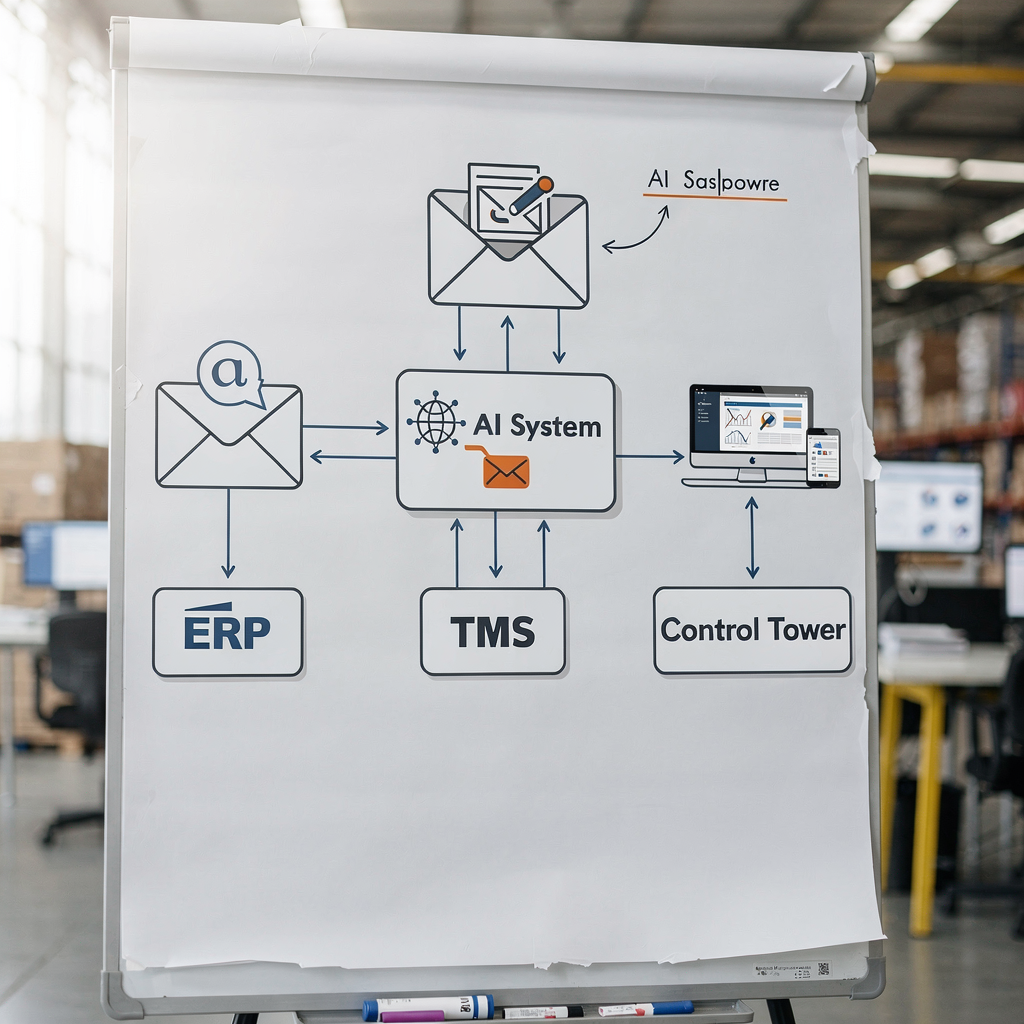
Integrating AI-powered email into ERP and control towers unlocks the most measurable value. Two‑way sync ensures an incoming message that mentions a delayed shipment can create a case in TMS, update inventory projections in ERP and surface the event in a control tower dashboard. Teams choose webhook or API approaches depending on latency needs and system openness. Webhooks suit near real‑time notifications. APIs support transactional writes that require validation and audit trails.
Typical integration patterns include automatic case creation in CRM or TMS when an exception appears, feeding parsed fields to the control tower and writing status changes back to ERP. Risk areas include mapping fields, accidental duplicate records and latency. To mitigate these risks validate extracted data before an ERP writeback. Implement a review step for any uncertain matches. Another safeguard is role‑based access and audit logs so every change is traceable.
Example flow: an email reports a delayed container. The AI extracts the booking reference and carrier. It checks ERP for affected POs and suggests an automatic inventory re‑allocation. If thresholds are crossed the control tower receives an alert and an operational dashboard shows the impact on days‑of‑cover. This single flow reduces manual handoffs and provides a single source of truth.
When you integrate, pick vendors that support reliable connectors. For ERP-focused teams, erp email automation for logistics is essential. virtualworkforce.ai connects to ERP, TMS and WMS so email data becomes structured and actionable. Use short validation rules to reduce errors. Overall, integrate early with the control tower to keep dashboards current and to streamline shipment updates in real-time.
Draft and reply faster with generative AI templates: how to automate email drafting and approvals
Generative AI can draft clear, consistent replies for logistics email drafting and routine supplier communications. Use generative AI to produce first drafts that follow approved templates. Then present the draft to an operator with the suggested edits highlighted. This workflow speeds replies while maintaining control. It is important to add guardrails: approval gates for high‑risk emails, required signature blocks and an audit trail showing edits.
A practical drafting flow looks like this. The assistant creates a draft based on parsed data and a chosen template. The draft includes dynamic PO and confirmation fields and a suggested SLA clause. A supervisor can accept, edit or reject the draft. Prompt templates and tone controls ensure every message matches the brand. Keep a record of edits to train models and to support compliance audits.
KPIs for generative drafting include the percent of replies auto‑drafted versus sent unchanged, human override rates and time saved per message. Many teams find that 40–60% of routine replies can be auto‑drafted and then sent with minimal edits. For complex exceptions, the AI assistant can fill the first pass, making it faster for humans to finalize the message.
Controls include signature and SLA insertion, required approvals for contractual language and explicit prompts to include or exclude sensitive information. Use a versioned template library and ensure business users configure tone. For teams that must comply with strict record keeping, enable full edit history. If you use chatGPT or other ai models for drafting, ensure the model is grounded in email history and operational data before sending. This reduces risk and improves quality over time.
Drowning in emails?
Here’s your way out
Save hours every day as AI Agents label and draft emails directly in Outlook or Gmail, giving your team more time to focus on high-value work.
Measure productivity: use email history, inbox analytics and choose the best AI email assistant for logistics companies
Measuring the effect of an AI email assistant is essential. Define KPIs such as email handling time, response SLAs, on‑time delivery impact and template usage. Use email history to train and validate models, and use analytics to spot regressions. Benchmarks to expect include communication efficiency improvements of about 30% and inbox handling time reductions near 40% in many pilots (30% efficiency) (40–50% time saved).
A vendor evaluation checklist simplifies selection. Look for security, ERP connectors, SLA guarantees, thread-aware email memory, and a solid template library. Also require role‑based access and audit logs, and verify that the vendor helps reduce manual lookups by grounding replies in operational systems. Here is a short vendor evaluation checklist:
– Security and compliance: encryption and role‑based access; – ERP and TMS connectors: native or documented APIs; – Template library and generative controls: editable templates and approval gates; – Thread memory and email history: to support long conversations; – SLA and support: clear SLAs for uptime and onboarding.
Choose the best ai email assistant by testing with a lane of real emails. Track time saved, time saved per email and the impact on the dashboard metrics. Use analytics to show where the assistant helps logistics professionals most. For more tactical advice, read our piece on how to scale logistics operations without hiring and the best tools for logistics communication which highlight practical vendor differences (scale guide) (tool guide). This approach helps teams pick a solution that will cut handling time and simplify email work.
Adopt and scale: use AI agents, build a template library, simplify workflows and maintain compliance
To adopt and scale an assistant and AI, start with a focused pilot. Pilot one inbox or a single corridor. Collect email history and build an initial template library. Train lightweight ai agents on representative messages and let business users configure tone. This gradual approach reduces risk and helps teams measure time saved and compliance impact.
Rollout steps are straightforward. Define pilot scope, integrate with ERP/TMS, set SLAs and KPIs, and do a compliance review. Then expand to other lanes and monitor model drift. Governance is crucial. Set access controls, a retraining cadence and change management for staff. Role‑based access and audit logs ensure traceability. Keep a single source of truth for templates so changes propagate safely.
Operational details matter. Let staff focus on exceptions by automating routine work. Use ai agents to route or resolve messages automatically. Build escalation paths so the assistant escalates only when strict criteria are met. Also ensure the system can simplify email tasks across multiple email accounts and shared inboxes. Virtualworkforce.ai shows how an assistant for logistics can automate the full email lifecycle so teams handle fewer repetitive tasks and focus on strategic work.
Quick checklist: pilot scope; integrate with ERP and control tower; define SLAs; set KPIs; compliance review; train ai agents; expand gradually. Maintain model governance so ai capabilities keep improving. Use regular audits and keep template updates documented. When scaled, the assistant reduces email chaos and makes the inbox an operational workflow rather than a bottleneck. Explore our automated logistics correspondence to learn how to make this change practical and repeatable (automated correspondence).
FAQ
What is an AI email assistant for supply chain?
An AI email assistant is a software tool that reads and acts on operational email. It automates triage, extracts structured data and drafts or sends replies based on rules and templates.
How much time can an AI assistant save on email handling?
Time saved varies by workflow. Many teams report reductions in email handling time of 30–50% when they automate routine tasks (time savings). Real gains depend on integration and template coverage.
Can the assistant integrate with ERP and TMS?
Yes. Most effective deployments integrate with ERP, TMS and control towers to update order status and create cases. This two‑way integration helps keep dashboards current and reduces manual lookups.
Is generative AI safe for customer‑facing replies?
Generative AI can speed drafting, but guardrails are essential. Use approval gates for high‑risk messages, require signature blocks and keep edit histories for compliance.
How do templates speed logistics email replies?
Templates remove repetitive typing and ensure consistent language. Smart templates with dynamic fields fill POs and tracking numbers automatically, which reduces errors and time to reply.
What KPIs should I track when piloting an assistant?
Track email handling time, response SLAs, template usage, impact on on‑time delivery and the rate of human overrides. Use these metrics to quantify value and refine templates.
How does the assistant handle ambiguous emails?
The assistant flags uncertain cases for human review and can open a verification task. Hybrid rule + NLP workflows reduce false positives while keeping automation high.
Can I let business users edit templates?
Yes. Letting business users configure tone and templates speeds adoption. Provide role‑based access and an approval process for template changes to maintain governance.
What security controls are needed?
Encryption, role‑based access and audit logs are minimum requirements. Also ensure connectors respect data governance policies and that sensitive data is handled according to compliance needs.
How do I choose the best ai email assistant?
Evaluate security, ERP connectors, template library, thread‑aware memory and SLA terms. Run a pilot with real email history and measure time saved and impact on logistics operations. For vendor comparisons see our pages on virtual assistant logistics and the best tools for logistics communication (virtual assistant) (tools guide).
Example template: Shipment delay acknowledgement
Subject: Shipment Delay – Booking [tracking] / PO [PO#]
Body: We received notice of a delay for booking [tracking]. We are confirming carrier updates and will provide an updated ETA within [SLA hours]. We will also check inventory impact and propose re‑allocation if needed. Thank you for your patience. [Signature]
Example template: PO confirmation
Subject: PO Confirmation [PO#]
Body: We confirm receipt of PO [PO#] for [item list]. Expected ship date is [date]. Please confirm packing list and carrier details. If you need to update quantities or delivery windows, reply to this email with the revised PO line. [Signature]
Drowning in emails?
Here’s your way out
Save hours every day as AI Agents label and draft emails directly in Outlook or Gmail, giving your team more time to focus on high-value work.