


ai email assistant: what it is and why training companies need it
An AI EMAIL ASSISTANT is an AI tool that drafts, suggests or sends emails and automates routine inbox tasks. For training providers, that capability matters a lot. Training teams manage schedules, confirmations, assessments and certification notices, and they rely on clear email communication. Across the industry, AI tools report clear gains in PRODUCTIVITY, with one group finding up to a 66% improvement in employee efficiency when teams adopt AI for communication and admin AI Improves Employee Productivity by 66% – NN/G. That figure helps explain why many organizations look to an email assistant that drafts or to other solutions that reduce repetitive work.
Training providers benefit because AI reduces manual steps and human error. For example, enterprise teams using automation saved time on scheduling and follow-ups, which improved learner satisfaction AI in Customer Service Statistics [2026] – Master of Code. A case study from operations platforms shows Worker teams cut handling time per message significantly, which translates into saved hours for trainers and admins. In practical terms, Administrate-style setups report saving roughly 120 hours per month by automating learner communications, and other enterprise cases show 20–30% time savings on email and task work.
AI capabilities let trainers keep pace with large cohorts and remote learners. An AI MAIL ASSISTANT labels incoming messages, routes them, and drafts correct replies grounded in system data. That reduces mis-scheduled sessions and lowers admin cost. When you consider certification admin, automated confirmation and logging of EMAIL HISTORY prevents lost documents and provides an audit trail. For operations that depend on ERP or LMS lookups, virtualworkforce.ai demonstrates thread-aware memory and deep data grounding so the tool answers accurately, not just fluently. If you want to learn more about enterprise use in operations, see resources on automated logistics correspondence and how to scale logistics operations without hiring automated logistics correspondence and how to scale logistics operations without hiring.
Quick facts: companies adopting AI see faster replies, fewer manual errors, and lower administrative overhead. In sum, training organizations need tools that draft dependable email content, maintain consistent tone across cohorts, and keep learners informed with minimal manual effort. For many teams, a BEST AI EMAIL ASSISTANT becomes the operational backbone that enables trainers to focus on learning, not email.

reply faster: draft and automate email replies for learners and trainers
Faster REPLY times improve learner satisfaction and reduce friction. When an AI drafts messages, teams respond with speed and clarity. Auto-drafting features generate context-aware DRAFTs and canned replies, and they let trainers edit before sending. That balance matters: it keeps quality high and yet allows human oversight. In practice, automated setups can reduce response time by up to 50%, which boosts learner trust and decreases follow-up questions AI in Customer Service Statistics [2026] – Master of Code.
Key ai feature examples include sentiment detection, priority routing, and template suggestions. Sentiment detection flags critical emails that need human attention. Priority routing directs urgent queries to the right person so nothing slips through. Meanwhile, contextual suggestions let the trainer accept a ready draft or tweak the tone. Tools like Flowrite and Gmail Smart Compose show how EMAIL DRAFTING speeds work for professionals, and more advanced generative ai models can shape tone for learners versus corporate contacts.
Here is a compact before/after example. Manual reply: a trainer reads a long thread, looks up a batch ID, writes a detailed message, and sends it. That takes many minutes. AI draft: the ai reads the thread, fetches the batch ID from the LMS, and generates a draft reply that includes the correct dates and links. The trainer reviews and sends. That flow lets teams SEND AUTOMATICALLY when rules allow, or edit when context demands. For teams using a GMAIL ACCOUNT or Outlook, smart assistants can compose replies inside the existing EMAIL CLIENT and keep all conversation context in place.
Because the assistant can draft and send or produce DRAFT emails for review, teams save time and reduce repetitive email tasks. For trainers, the result is clearer confirmations and fewer duplicate messages. For learners, the result is faster answers and higher course completion. If you want implementation ideas for training ops that mirror logistics automation, check a guide on AI for freight forwarder communication for related patterns AI for freight forwarder communication.
Drowning in emails?
Here’s your way out
Save hours every day as AI Agents label and draft emails directly in Outlook or Gmail, giving your team more time to focus on high-value work.
inbox and keep your inbox tidy: email management and workflow automation
Clean INBOXES reduce missed messages and improve team handovers. AI helps by triaging unread emails, tagging priority messages, and applying archive rules. An effective system will AUTOMATICALLY CATEGORIZE INCOMING EMAILS so staff spend less time sorting and more time teaching. When inbox management works, shared ownership of learner queries becomes simple, and long EMAIL THREADS stay coherent and auditable.
Benefits include fewer missed messages, predictable handovers across shifts, and 24/7 triage for global learners. Reports suggest up to 40% cost savings in administrative overhead when organizations adopt automation for EMAIL TASKS and routine message handling AI in Customer Service Statistics [2026] – Master of Code. That saving applies to training teams that juggle confirmations, rescheduling and certificate requests.
Use this short checklist to set up an efficient inbox: rules, templates, auto-foldering, notification settings, and CRM/LMS integrations. First, create rules that route messages to folders by intent. Second, attach templates for common responses so teams can send high-quality replies fast. Third, enable auto-foldering so completed workflows move out of the main queue. Fourth, set smart notifications only for critical emails. Fifth, sync with your LMS and CRM so the system can fetch student records automatically. If you need a logistics-style example that shows deep systems integration, read about ERP email automation for logistics ERP email automation logistics.
Checklist items here also mention INBOX MANAGEMENT and routing logic. For teams that face many incoming emails per employee per day, automated triage and tagging means trainers no longer hunt through long lists. Instead, the system surfaces critical emails and routes them to the right owner. That reduces time spent in the inbox and helps staff focus on teaching rather than managing notifications.
workflow: automate scheduling, follow-ups and email history for courses
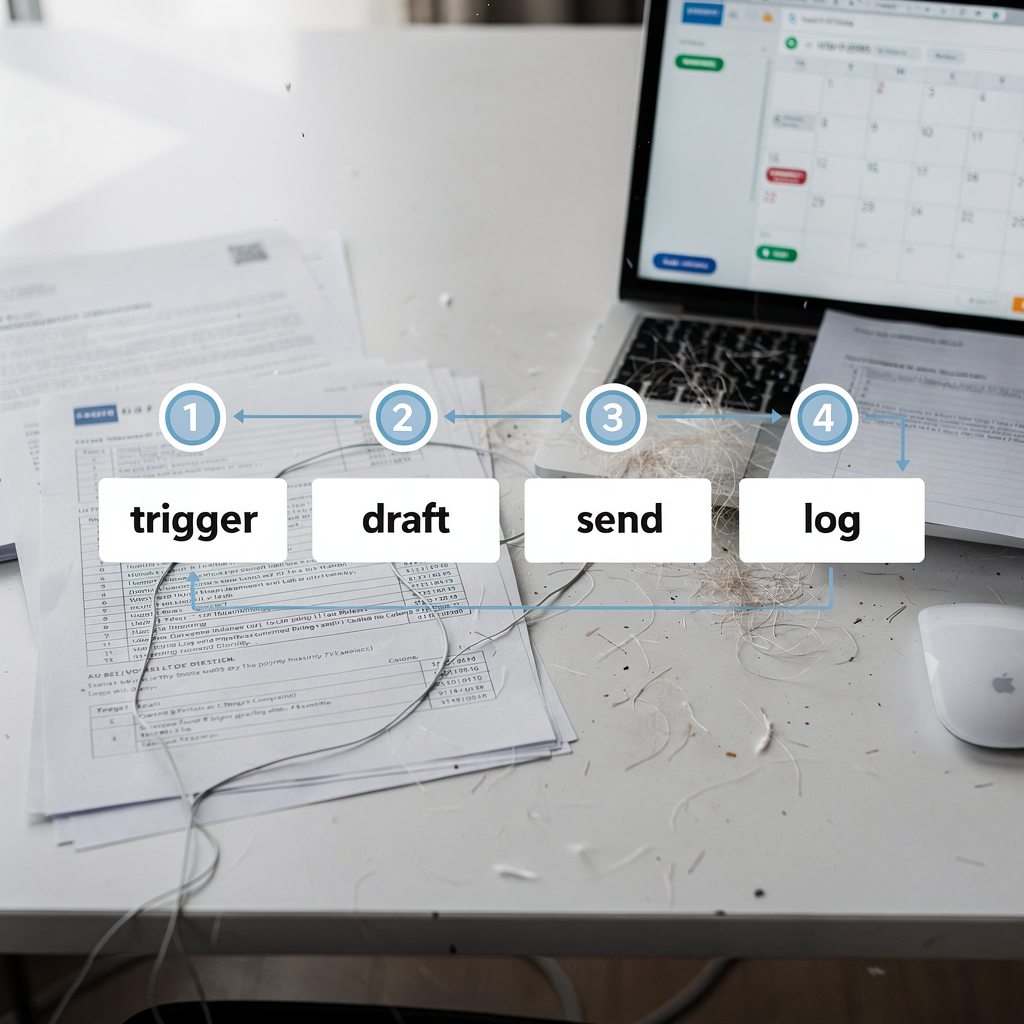
A clear WORKFLOW that links triggers to messages speeds operations. Training workflows typically include enrolment confirmation, pre-course reminders, live-session links, and post-course follow-up. AI can HELP YOU WRITE emails for each stage, and it can log the ENTIRE EMAIL THREAD so compliance and audits remain straightforward. Use a four-step text diagram to explain the process: trigger → draft → send → log. The ai fills each step by detecting intent, generating a draft, sending or queuing the message, and storing the EMAIL HISTORY.
Automated scheduling saves admin time and reduces no-shows. When the system creates calendar events and attaches links, learners get clear instructions. Multistage follow-ups increase engagement. Analytics from AI platforms show better open rates when reminders arrive at optimal times. For training organizations, that means higher completion and better learner satisfaction. McKinsey reports that employees with AI tools report higher job efficiency, especially in client-facing roles like training AI in the workplace: A report for 2025 | McKinsey.
Here is how AI fills each step in the 4-step flow. Trigger: enrolment or a learner question arrives. Draft: the assistant generates a tailored message that includes key data from the LMS or ERP. Send: the tool can SEND AUTOMATICALLY for routine confirmations or queue the draft for human review. Log: the system stores the message and tags it for future queries and audit trails. That logic reduces repetitive email tasks and frees staff to focus on content delivery. For operations teams that need deep grounding in systems like ERP, TMS or WMS, virtualworkforce.ai demonstrates examples of route them to the right escalation paths and attach full context so humans intervene only when needed.
Drowning in emails?
Here’s your way out
Save hours every day as AI Agents label and draft emails directly in Outlook or Gmail, giving your team more time to focus on high-value work.
draft templates and email replies: building reusable templates and smart ai email for training
Templates speed consistency and let teams scale reliable communication. Build TEMPLATE types for enrolment, reminder, resource sharing, feedback requests, and upsell or sales emails. Keep templates short, include a clear CTA, and personalise using tokens such as student name, course ID, or session time. A well-configured template reduces errors and cuts the need to write the same message repeatedly.
Best PRACTICES for templates are straightforward. Keep messages concise. Use tokens for personalisation. A/B test subject lines and tone to see what works. Measure performance using open and reply rates so you know which MESSAGE and subject line performs best. If you track analytics across EMAIL WORKFLOWS, you can adjust timing and content to improve engagement.
Sample template (concise): “Hi [Name], thanks for enrolling in [Course]. Your session starts on [Date]. Please find the prep pack here. Reply if you need help.” That short template covers the essentials, and a smart assistant can expand it when context requires more detail. Use the AI model to populate tokens automatically and to create drafts replies for unusual queries. For teams using EMAIL APPS, templates integrate with the email composer and can generate subject suggestions and preview content. Also, when you use an assistant that can automatically categorize incoming emails, you reduce manual sorting and improve turnaround.
Track template results to iterate. Measure open rates, reply counts and course attendance after reminders. Those metrics show whether a template drives behavior. If you need examples of template use in logistics or customs communications, see AI for customs documentation emails AI for customs documentation emails.
best ai email assistant and ai assistant selection: how to use an ai, choose an ai mail assistant and improve productivity (including sales emails)
Choosing the BEST AI EMAIL ASSISTANT starts with clear criteria. Look for accuracy of drafts, a broad TEMPLATE LIBRARY, integrations with Gmail and Outlook, CRM and LMS connectors, and strong data security for GDPR compliance. Evaluate whether the vendor offers thread-aware memory so the system understands the ENTIRE EMAIL THREAD and can reference past context. Also, confirm the platform supports email-based audit trails and stores EMAIL HISTORY for compliance.
Selection checklist: accuracy of DRAFTS, integration with your email client, analytics for KPI tracking, customisation of tone, support for ROUTING and escalation, data governance, and ease of rollout. Pilot with one cohort to validate ROI. Measure saved minutes per message and scale if KPIs improve. Typical rollout timeline follows: pilot → train staff → measure → scale. For operations teams, virtualworkforce.ai shows a path to reduce handling time from about 4.5 minutes to ~1.5 minutes per message while increasing consistency and response speed.
When including SALES EMAILS, tune tone and cadence differently than learner-facing messages. Sales emails should focus on value and polite persistence. Avoid over-personalisation risk and control AI outputs with clear guardrails. Use a pilot to test business emails and monitor performance. The selection process should include security checks, review of the underlying AI MODEL, and clarity around logging and traceability. If you need logistics-specific selection help, review the virtualworkforce.ai ROI logistics page for comparisons and outcomes virtualworkforce.ai ROI logistics.
Decision checklist (6 points): 1) accuracy and controls; 2) integrations with email providers and LMS; 3) thread-aware memory; 4) analytics and reporting; 5) data security and governance; 6) support and training. Implementation timeline (quick): week 1 pilot setup, week 2 staff training, week 3 live testing, week 6 measure and adjust. With that plan you can USE AN AI to draft and send routine email and to free teams to focus on high-value work. Remember that AI LEARNS from interactions, and with good governance it will help you WRITE BETTER EMAILS while maintaining consistent quality.
FAQ
What is an AI email assistant and how does it help training companies?
An AI email assistant drafts, suggests or sends emails and automates routine inbox tasks. It helps training companies by reducing manual work, improving response times, and maintaining consistent communication with learners.
How much time can I save by using an AI assistant for emails?
Time savings vary, but studies show companies can see significant gains; for instance, productivity improvements of up to 66% have been reported when teams adopt AI tools for communication AI Improves Employee Productivity by 66% – NN/G. Specific pilots often show minutes saved per message that add up across teams.
Can an AI automatically categorize incoming emails?
Yes. Modern systems can automatically categorize incoming emails by intent, urgency and customer, which helps route them to the right owner. This reduces triage time and protects shared inbox context.
Will the assistant send messages without human review?
That depends on your rules. You can configure the system to send automatically for routine confirmations or to queue drafts for human review for critical emails. Choose a workflow that balances speed and control.
How do templates fit into an AI-powered email process?
Templates provide consistent structure and save time. AI can populate tokens, personalise the content, and suggest subject lines. Teams should A/B test templates to find what yields the best open and reply rates.
Is the AI safe for student data and GDPR?
Security matters. Choose a platform with strong governance, access controls, and data-grounding in your systems. Verify how the vendor stores EMAIL HISTORY and whether they offer enterprise compliance features.
What analytics should I track during a pilot?
Track time saved per message, response time, open and reply rates, and learner satisfaction. Those metrics show whether the assistant improves operational efficiency and course outcomes.
Can the assistant help with sales emails too?
Yes, but tune the assistant differently for sales emails versus learner-facing messages. Sales requires a distinct tone and cadence. Pilot and monitor results before wide rollout.
How do AI tools handle long conversations and email threads?
Advanced assistants keep thread-aware memory so they reference the entire email thread and previous context. That prevents repeated questions and improves continuity across conversations.
What steps should I take to rollout an ai assistant?
Pilot with a single cohort, train staff, measure key metrics, and then scale. Use clear rules for automation and escalation so the system acts reliably and teams retain control.
Drowning in emails?
Here’s your way out
Save hours every day as AI Agents label and draft emails directly in Outlook or Gmail, giving your team more time to focus on high-value work.