


Why automation and email automation matter for recruitment and recruiter productivity.
Staffing teams spend hours every day managing inbound messages, and that time adds up. AI can reduce the burden, and when applied to email it becomes a measurable productivity lever. For example, a recent overview notes that AI-powered email assistants cut email management time by roughly 25–40% for knowledge workers, which includes recruiters and staffing roles (Forrester). Also, McKinsey highlights that typical office workers can free 2–3 hours a day by applying automation to routine tasks (McKinsey summary). These figures mean faster responses, fewer missed candidates, and higher placement velocity.
First, automation reduces manual work by routing and drafting routine recruitment email replies, and second, it preserves context so the right recruiter has ownership. Next, teams that automate gain the capacity to focus on high-value candidate screening and relationship building. Therefore, a quick KPI to track is time spent per candidate email. Also, track average response time and the reduction in manual mail logging. These three metrics show whether an automation program truly helps recruiters or just shifts tasks around.
Recruiters who use AI can shift focus from low-value chores to candidate outreach and sourcing. For instance, when AI drafts initial outreach but leaves scheduling and negotiation to humans, recruiter time is spent where it matters most. In practice, design automation so it is transparent and auditable. That way, recruiters retain control and the candidate experience remains personal. Finally, teams that measure impact often see improved response rates and better alignment between recruiter actions and business goals, and that drives recruiter productivity.
How ATS/CRM integration (bullhorn, bullhorn automation, recruitment software) lets staffing agencies automate outreach and recruiting workflows.
Integration between your ATS and email inbox changes daily operations. When your mail syncs with applicant tracking records, team members stop duplicating work and they avoid lost threads. In fact, nearly all large organisations now use an applicant tracking system with integrated email functionality, which reduces manual entry and improves candidate history capture (ATS adoption data). Also, agencies commonly report roughly a 30% drop in admin time after deploying inbox sync and Bullhorn-style automation.
Pick an ATS or CRM that supports two-way sync, and ensure activity logging is complete. Then, build a template library for common recruitment email types and include variable tokens to keep messages personal. A practical implementation note is to prioritise two-way sync, template reuse, and searchable activity logging when selecting recruitment software. Next, set folder rules and routing so hiring managers can see progress in one place. This reduces manual work and speeds up the recruiting process.

Also consider the benefits of combining ATS records with CRM outreach sequences. Recruitment automation that links candidate records to email activity keeps a single source of truth. For teams that want hands-off automation, bullhorn automation or similar integrations deliver consistent outreach without losing traceability. Finally, integrate your email with ERP or HR systems where needed so candidate interactions reflect offers and onboarding steps; this kind of enterprise connection is what automation software for staffing should provide.
For more on linking email activity to operational systems and scaling the inbox, see guidance on how to scale logistics operations with AI agents, which applies to staffing in large teams (scaling with AI agents). Also, explore inbox automation approaches that combine drafting and data grounding so every message is accurate and traceable.
Drowning in emails?
Here’s your way out
Save hours every day as AI Agents label and draft emails directly in Outlook or Gmail, giving your team more time to focus on high-value work.
Using AI to automate candidate outreach, recruitment email and resume screening to recruit faster.
AI recruiting tools let teams trigger personalised recruitment email sequences based on candidate status and CV content. For example, you can set a status-based trigger: new CV → qualification message → interview scheduling sequence. This pattern keeps outreach consistent while letting humans intervene at key moments. AI can also read CVs to auto-prioritise applicants so recruiters see the best candidates first.
Use AI to draft recruiting email that references a candidate’s skills and recent role, and then let a recruiter proof and send. That approach strikes a balance between speed and personalization. In addition, AI recruitment tools power parsing and ranking so sourcers spend less time on manual screening. A useful guardrail is to use template tokens plus human review to avoid robotic-sounding messages and to protect the employer brand.
Automated recruitment workflows can include a triggered followup sequence for passive candidates, and they can also send interview confirmations and reminders that cut no-shows. Also, combine email with text messaging for immediate confirmations; email and sms together reach candidates on their preferred channel. Be careful to configure consent and GDPR-compliant options for candidate outreach. Finally, when AI is grounded in your data it reduces errors, and that improves the candidate experience and speeds the hiring process.
For recruiters who need full lifecycle automation grounded in operational data, virtualworkforce.ai offers end-to-end email lifecycle agents that draft, route, and log replies using ERP and document sources. See how data-grounded drafting can reduce handling time and keep context in long candidate threads (ERP-grounded email automation). This model helps recruiters focus on evaluation and hiring decisions rather than routine copying and pasting.
Choosing an automation tool: compare automation tool, recruiting automation software and email outreach tools for staff — a tool for recruiters checklist.
Choosing the right tool matters. Start with decision criteria that match your priorities, and then run a short pilot. Key decision points include ease of ATS or CRM integration, the depth of template personalisation, scheduler and reminder capability, analytics, and GDPR/compliance features. Also review whether the vendor offers a zero-code setup or if you need developers for every change. This step will save time and avoid brittle workflows.
Use a simple checklist when evaluating each option: integration / templates / analytics / security. Then map three candidate tools against those categories and run a two-week pilot to measure results. Choose the tool that best supports recruiting workflows and that reduces manual work without losing the human touch. A typical shortlist might include Bullhorn-style integrations, specialist recruiting automation software, and focused email outreach tools that support behavior triggers.
Remember that outreach tools with behaviour triggers outperform generic sends. For instance, industry stats show automated emails can achieve substantially higher opens, clicks, and conversions (CRM automation stats). Therefore, prefer an automation tool that supports conditional sends, and that logs every interaction to your applicant tracking system or CRM. Also, check whether the vendor supports marketing automation patterns for longer nurture sequences, and whether it offers audit trails for compliance.
Finally, ensure the platform is designed to help staffing teams maintain their employer brand. Pick the best tool for your scale and measure recruiter productivity during the pilot. For practical tips on zero-code automation that connects to operational sources, review how to automate emails with Google Workspace and virtualworkforce.ai for ideas on deployment and governance (Google Workspace automation).
Drowning in emails?
Here’s your way out
Save hours every day as AI Agents label and draft emails directly in Outlook or Gmail, giving your team more time to focus on high-value work.
Implementation: design automation workflows where automation helps protect employer brand and boost recruiter productivity.
Good implementation starts with mapping core recruiting workflows and then applying automation where it protects brand and reduces manual tasks. Begin with onboarding sequences, then add interview scheduling and reminders, rejection and feedback flows, and long-term nurturing drips. Each automated step should have a human escalation point so sensitive messages get review. This balances speed with the human touch that candidates expect.
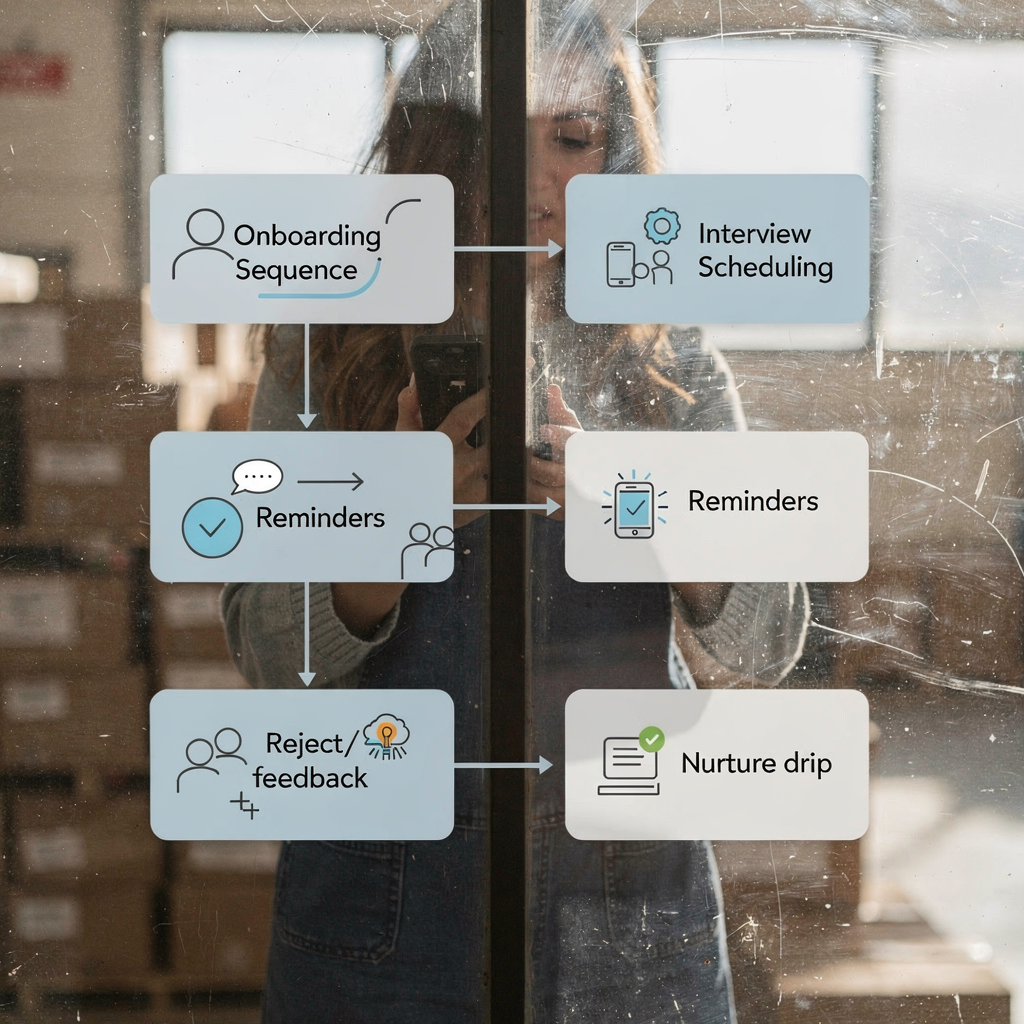
Design templates that include personalization tokens but require a human sign-off for offer and rejection messages. Also create cadence rules so candidates don’t receive too many messages in a short window. Use process automation to ensure every automated update writes back to the ATS or applicant tracking record, and maintain a single source of truth for candidate history. This practice improves traceability and avoids duplicated outreach.
Measure success with candidate NPS, no-show rate, time-to-interview, and placements per recruiter. These KPIs show whether automation improves outcomes and recruiter productivity. Also audit triggers and templates regularly to catch errors and to keep messaging fresh. And include social recruiting and outreach channels in your sequences so you reach active and passive job seekers. Finally, define approval gates for high-impact messages to protect the employer brand while still scaling communication.
Metrics, risks and best practice for automated recruitment: measuring impact and avoiding over-automation while using outreach tools and social recruiting.
Track the right metrics to quantify impact. Key metrics include open / click / conversion uplifts, reply-to-hire rate, and time saved per recruiter. Industry statistics show automated campaigns can outperform manual sends, and you should benchmark your results against those baselines (automation uplift data). Also, monitor candidate engagement and response rates to confirm the candidate outreach is effective.
Risks include impersonal messages, compliance breaches such as GDPR violations, and wrong triggers that send inappropriate messages. Mitigate these by A/B testing templates, auditing triggers monthly, and building clear fallback paths to human review. Also log every message in the ATS so recruiters can see the full history. Use recruiting automation tools that include audit trails and consent management to make compliance easier.
Best practices call for blending automation with human touchpoints. Start automated updates with a human-signed introduction for important interactions, and use personalization to send the right message to the right candidate. In addition, include text messaging options and email and sms combinations for confirmations and quick responses. Finally, run pilots that measure recruiter productivity and candidate experience, and then iterate. If you want a model built for operational accuracy and thread-aware memory across long conversations, consider solutions that automate the full email lifecycle and that are designed to help staffing and ops teams reduce handling times (email lifecycle automation). This approach keeps your business consistent and scalable.
FAQ
How does email automation improve recruiter productivity?
Email automation reduces manual tasks like drafting and logging, and it speeds response time. As a result, recruiters spend less time on routine messages and more time on candidate screening and relationship building.
Can AI ensure messages feel personal?
Yes. AI can populate templates with candidate-specific details and suggest personalization tokens, and a human review step preserves tone. This balance maintains the human touch while scaling outreach.
What metrics should staffing firms track after implementing automation?
Track time saved per recruiter, response times, open/click/conversion uplifts, no-show rates, and candidate NPS. These KPIs reveal both productivity gains and candidate experience improvements.
Is integration with an ATS necessary?
Integration is highly recommended because it keeps candidate records and email threads in a single place. An integrated applicant tracking system reduces manual data entry and improves traceability.
How do I avoid compliance risks with automated recruitment?
Implement consent capture, store audit trails, and configure regional compliance settings like GDPR. Also, run regular audits of triggers and templates to prevent errors.
What is a good pilot for choosing a recruitment automation tool?
Run a two-week pilot with three shortlisted tools and map them against integration, templates, analytics, and security. Measure key KPIs and pick the best fit for your team.
Can automation handle interview scheduling?
Yes. Automation can send invites, confirm slots, and send reminders, which reduces no-shows. For complex negotiation you may still want a human touch for final confirmation.
Should I include SMS in candidate outreach?
Yes, SMS is effective for confirmations and urgent messages, and pairing email and sms increases reach. Make sure consent and opt-out options are in place for compliance.
How do I maintain employer brand with automated updates?
Use branded templates, add human sign-offs for sensitive messages, and include personalization tokens. Also audit tone regularly to keep messages aligned with your brand values.
What common mistakes should we avoid when deploying recruitment automation?
Avoid over-automation, poorly tested triggers, and missing audit trails. Also, prevent repetitive or impersonal messaging by A/B testing templates and keeping clear escalation paths for human review.
Drowning in emails?
Here’s your way out
Save hours every day as AI Agents label and draft emails directly in Outlook or Gmail, giving your team more time to focus on high-value work.