


ai cybersecurity: how ai assistants detect threats in real time
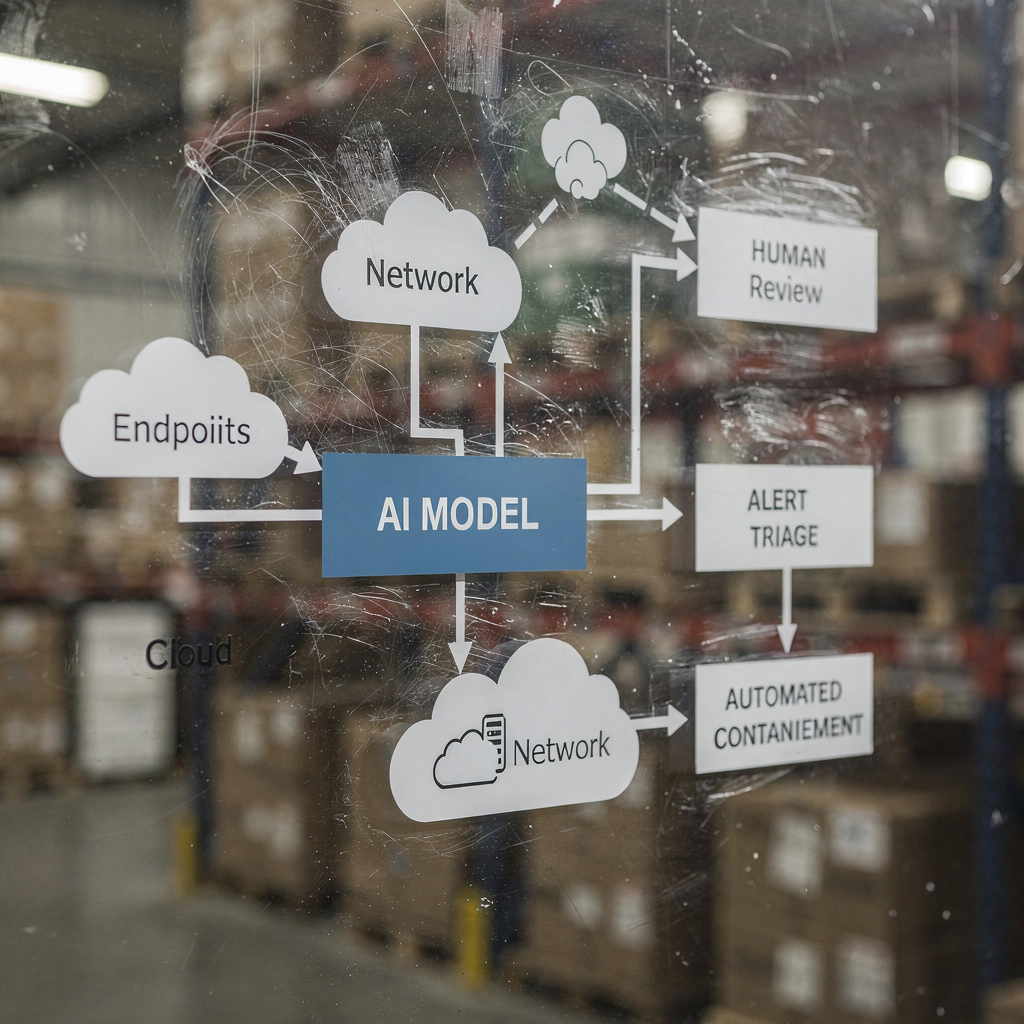
AI helps SECURITY TEAMS detect anomalies and threats at scale, and it does so continuously. For example, an AI assistant can monitor logs, correlate telemetry, and surface a real-time alert when patterns match a known signature or an unusual behavioural fingerprint. This capability matters because 77% of companies are either using or exploring AI in operations, which explains the strong AI adoption across enterprise environments 77% adoption statistic. In practice, AI-driven telemetry ingestion, feature extraction and scoring run many times faster than manual review. The flow typically starts with telemetry → an AI model → alert triage → response. A simple loop might look like this: sensors feed endpoint and network data, the AI model scores anomalies, the system raises an alert, and then containment triggers a playbook. This is especially useful for real-time threat detection where minutes matter.
AI cybersecurity tools already power many detection and response pipelines. A Review of Agentic AI notes that agentic AI can adapt to emerging threats and act with cognitive autonomy when configured to do so agentic AI in cybersecurity. Therefore, platforms that combine behavioural baselines with streaming analysis reduce dwell time and highlight unknown behaviours. In one short use case, the system detects a lateral movement pattern, issues an alert, isolates the endpoint, and escalates the incident to SOC for review. That automated containment loop saves time and reduces human error.
Security architects must decide what to automate and what to leave for analysts. For real-time monitoring, AI can filter noise and prioritise threats in a way that helps security teams to focus on high-risk incidents. At the same time, teams should require provenance and confidence scores for every recommendation, because studies show AI outputs can include inaccuracies and sourcing failures that matter in a security context sourcing failures study. Also, vendors now offer ai-powered cybersecurity platforms that integrate with SIEM, EDR and cloud feeds, enabling a fast detection and response workflow while keeping humans in the loop for critical decisions.
For organisations that handle a high email workload, there are operational AI applications too. For instance, virtualworkforce.ai uses AI agents to automate email lifecycles for ops teams, route messages, and attach context to escalations. That reduces time lost in triage and helps teams maintain a stronger security posture across communications. In short, ai cybersecurity in action both detects threats in real time and helps streamline the operational overhead that can otherwise distract SOC personnel.
security operations: using ai assistant to speed detection and remediation
Security operations rely on fast, repeatable workflows. AI can automate forensic timelines, run playbooks and speed up remediation while the SOC retains control. For example, integrations between XDR and SOAR allow an AI-powered suggestion engine to propose containment steps, and then an engineer can approve or override them. This mix of automation and human oversight trims mean time to detect and mean time to remediate. In fact, automation reduces analyst workload and can cut false positives when XDR correlations filter noisy signals.
Use cases show practical benefits. An AI model can parse thousands of alerts, group similar incidents, and generate a short summary for an analyst. Then the analyst decides whether to escalate. For routine phishing cases, the system can quarantine messages and mark affected endpoints, and then the SOC reviews the automated action. This approach helps SOC teams to focus on investigations that need human judgement. Also, automation of evidence collection and timeline construction speeds investigations and reduces the risk of missed indicators.
Teams should follow a change-management checklist before enabling automatic actions. First, define thresholds and confidence scores. Second, map playbooks to roles and approvals. Third, implement monitoring and rollbacks. Fourth, log every automated step for auditability. These steps help to safeguard the environment and maintain compliance. A practical dashboard shows AI suggestions with clear overrides; this streamlines the workflow and preserves accountability.
Metrics to track include alerts triaged per hour, false positive rate, and time to containment. These KPIs demonstrate improvement while keeping teams accountable. Also, the SOC should run periodic red-team checks and simulated incidents to validate the AI model and reduce automation bias among analysts. Research indicates that automation bias affects a high share of security professionals, which is why mandatory verification steps matter human factors and automation bias. Finally, teams should document when the system uses AI to automatically escalate, and when it waits for human approval. This clear policy helps both CISOs and frontline responders.
When your operations include heavy email workflows, consider combining security automation with email automation platforms. virtualworkforce.ai helps teams route and resolve operational emails, reducing noisy contexts that otherwise waste SOC time. For more on automating logistics email and scaling operational workflows, see this resource on automated logistics correspondence automated logistics correspondence.
Drowning in emails?
Here’s your way out
Save hours every day as AI Agents label and draft emails directly in Outlook or Gmail, giving your team more time to focus on high-value work.
xdr and darktrace: agentic ai examples in extended detection
Extended detection and response platforms unify signals across endpoint, network, cloud and email. XDR correlates these telemetry sources and applies models to reveal complex attack paths. Darktrace offers behavioural modelling and agentic AI features that adapt to changing baselines. In recent product updates, Darktrace emphasised autonomous forensics and adaptive responses, where the platform can take containment actions and generate human-readable reasoning for those steps. This approach gives teams a faster path to detection and response for both known and novel threats.
A typical scenario starts with endpoint anomalous behaviour that does not match a known signature. XDR correlates that action with unusual network flows, and the platform flags lateral movement. Then a containment action isolates the endpoint, while automated forensics captures artifacts. Darktrace AI examples show how machine learning can map an attacker’s actions across devices, then suggest a response that isolates the attack surface. That sequence helps to defend against ransomware and lateral propagation.
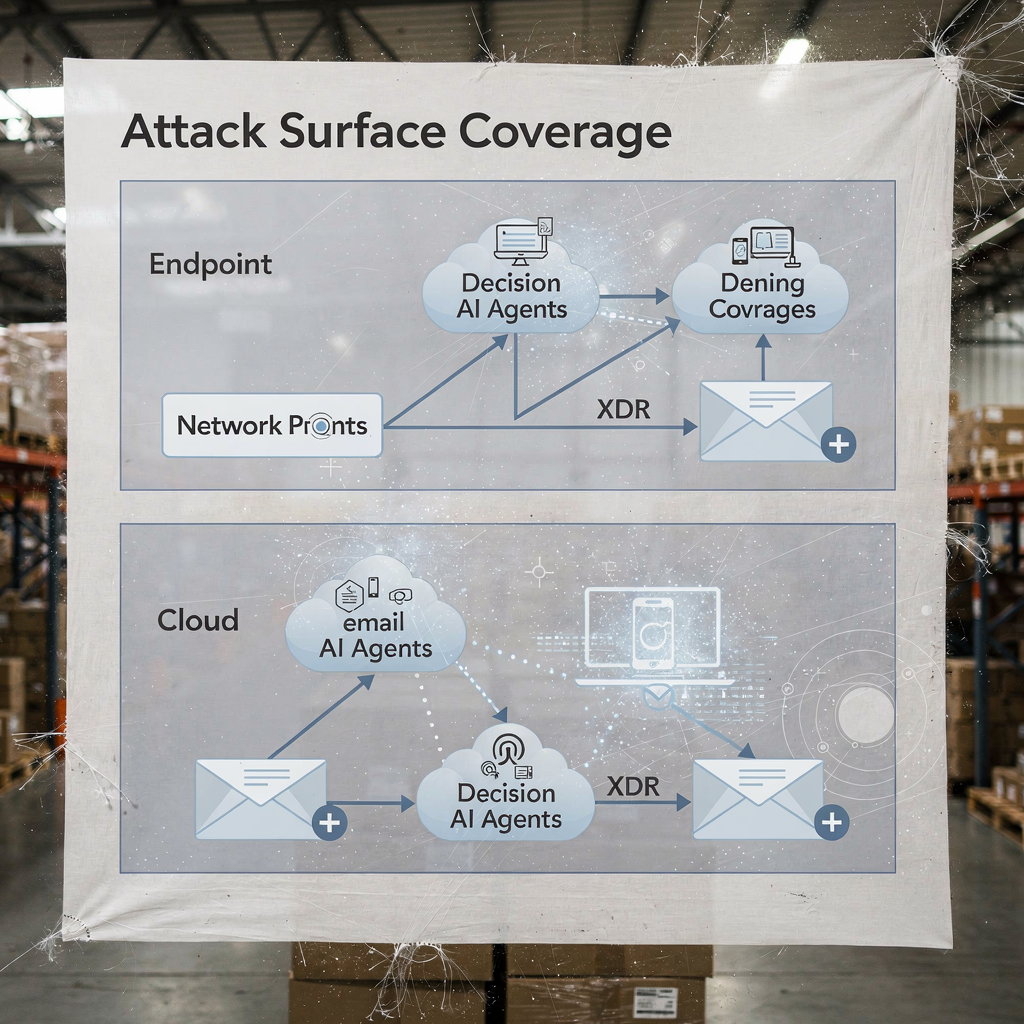
Practical integration requires a checklist. First, ensure your XDR ties into SIEM and SOAR for event enrichment. Second, map response playbooks for automatic versus manual actions. Third, configure the platform to export context to ticketing and email, so SOC teams retain end-to-end traceability. Fourth, test EDR-to-XDR handoffs and confirm telemetry fidelity. A layered diagram of XDR coverage and AI decision points clarifies who acts and when.
XDR benefits extend to cloud security and email security pathways. The platform combines endpoint telemetry, network flows and threat intelligence to create a wider picture of enterprise security posture. In deployments that involve Darktrace, security teams can see insights into attacker behaviour and rapid containment options. Still, teams should validate agentic AI decisions through audits, and maintain a log of every autonomously executed step for governance. For organisations in logistics and operations, integrating XDR insights with email automation helps maintain continuity while triaging threats that arrive via phishing or compromised accounts. See how AI can scale freight communication and preserve context in operational messages AI for freight forwarder communication.
analyst: automation bias, accuracy limits and ai is used as decision aid
Human factors shape how teams adopt AI. Automation bias and confirmation bias can lead security analysts to over-trust AI outputs. Studies show automation bias affects a large fraction of practitioners, and analysts must learn to treat AI as a decision aid rather than an oracle human factors in AI-driven cybersecurity. Also, research found that many AI-generated answers contain inaccuracies and sourcing issues, which is critical for incident response where trust in facts matters AI assistant sourcing failures. Therefore, SOC leaders should add mandatory verification steps and confidence thresholds to every automated recommendation.
Training plays a major role. Teams should run scenario drills, perform red-team exercises and require analysts to validate evidence before closing an incident. A practical control is to present provenance for each recommendation so analysts can trace alerts back to raw logs and the AI model states. Also, introduce error-handling procedures that specify what to do when the system shows low confidence or inconsistent outputs. This process reduces risk and keeps humans engaged in critical thinking.
Transparency helps too. Presenting a summary of why a suggestion arose, the signals that supported it, and the model version that generated it builds trust. For analytic work that uses natural language summaries, label them clearly to avoid overreliance. Because AI is used widely now, teams must balance speed with scrutiny. Use of confidence scores, and requiring an analyst sign-off for escalations, reduces blind automation.
Finally, guard against shadow AI in teams. Shadow AI occurs when individuals use unauthorised genai tools or gen ai services for quick answers. This practice can leak sensitive data and introduce inconsistent logic into investigations. Establish approved genai tools and a secure workflow for any external query or model call. Provide analysts with a clear path to escalate complex cases. In short, AI should empower the analyst, not replace judgement.
Drowning in emails?
Here’s your way out
Save hours every day as AI Agents label and draft emails directly in Outlook or Gmail, giving your team more time to focus on high-value work.
vulnerability and sensitive data: ai to monitor, defend and create new risks
AI helps to find vulnerabilities and to defend sensitive data, and yet it introduces dual-use risks. On the defensive side, AI to monitor logs and web traffic can detect patterns that indicate CVE exploitation attempts, and then trigger remediation to patch or isolate affected workloads. At the same time, malicious actors can deploy AI agents to automate reconnaissance, craft targeted phishing and even generate malware variants. Articles on emerging threats note the rise of automated or malicious AI employees that can perform insider-like social engineering malicious AI employee threat. That duality raises stakes for how you manage sensitive data access.
Privacy concerns appear when AI accesses logs that contain PII or operational secrets. To safeguard against leaks, enforce strict data access policies, use input/output filtering, and prefer on-premises or private-model deployments for high-sensitivity workloads. Also, log all AI actions and queries so you can reconstruct decisions and identify any anomalous data egress. For teams handling operational emails, ensuring that email automation platforms apply data-grounding and governance across ERP and document sources prevents accidental disclosure. Explore how email automation preserves context and reduces manual lookups in logistics workflows ERP email automation for logistics.
Design controls to detect malicious AI activity. Monitor for anomalous query volumes and unusual patterning that may indicate an automated discovery tool or an exfiltration pipeline. Implement throttles and quotas on queries that access large datasets. Conduct threat hunting that assumes attackers may leverage generative AI to craft polymorphic phishing and to craft plausible social engineering messages at scale. Also, review model outputs for hallucinations or unsupported claims, because sourcing failures can mislead analysts and expose systems to incorrect remediation steps.
Finally, protect models themselves. Model poisoning and data poisoning attacks can skew learning models and reduce detection accuracy. Periodic model validation and data provenance checks help detect poisoning attempts early. Maintain signed model versions and a rollback plan for compromised or degraded models. Taken together, these steps help defend sensitive data while enabling AI to monitor and protect systems effectively.
ai security and proactive cybersecurity: governance, validation and ai at every stage
Governance remains the foundation of safe AI adoption. Implement model validation, continuous testing, explainability and lifecycle policies before broad rollouts. Require provenance and sourcing checks, perform periodic accuracy audits, and use staged rollouts with rollback criteria. These controls align with regulatory obligations such as GDPR and EU guidance around data minimisation and transparency. Also, include CISOs in governance reviews and require clear incident playbooks that cover model failures.
Practical steps include pre-deployment testing, runtime monitoring, incident playbooks and defined rollback criteria. For instance, hold a pre-deployment dry run that checks the AI model against a test corpus that includes known malicious samples, noisy traffic and privacy-sensitive entries. Then monitor drift and accuracy in production, and schedule monthly audits. Use explainability tools to provide analysts with rationale behind key decisions. Such steps make ai-powered cybersecurity solutions auditable and trustworthy.
Adopt a checklist for production use: confirm access controls, implement input sanitisation, set retention policies, and require signed logs of every automated action. Track KPIs such as false positive rate, time to containment and percentage of alerts resolved with human oversight. Also, prepare a first-90-day roadmap for any AI deployment: baseline metrics, sandbox trials, staged enablement, training and governance sign-off. This approach helps to deliver proactive cybersecurity that can detect both known and unknown threats.
Finally, balance innovation with caution. Advanced AI and deep learning bring new ai capabilities to defender toolsets, but governance keeps those capabilities aligned with your security posture. If you need to scale operations without adding headcount, explore automating repetitive flows like operational email handling; virtualworkforce.ai shows how AI agents can reduce handling time and keep context attached to escalations, which supports both productivity and security goals how to scale logistics operations. Start small, measure impact, and iterate with clear guardrails.
FAQ
What is an AI assistant in cybersecurity?
An AI assistant in cybersecurity is an automated agent that helps monitor, analyse and prioritise security events. It provides decision support, automates routine investigative tasks, and surfaces high-confidence alerts for human review.
How do AI systems detect threats in real time?
AI systems ingest telemetry from endpoints, network and cloud, then apply models to detect anomalies that indicate compromise. They score events, group related activity, and raise real-time alerts so teams can act quickly.
Can AI reduce mean time to detect (MTTD)?
Yes. AI accelerates triage by grouping alerts, summarising evidence, and suggesting playbook steps, which lowers MTTD. However, teams must validate outputs to avoid automation bias and false positives.
What is XDR and how does it use AI?
XDR stands for extended detection and response and it unifies signals across endpoint, network, cloud and email. XDR platforms use AI agents and behavioural models to correlate events and suggest containment actions.
Are AI recommendations always accurate?
No. Studies show AI outputs can include inaccuracies and sourcing failures, so organisations must require provenance, confidence scores and human verification. Regular audits and validation reduce the risk of mistaken actions.
How do you prevent AI from leaking sensitive data?
Limit model access, use input/output filtering, prefer on-premises or private-model options for sensitive workloads, and log every AI action. Data access policies and retention rules also reduce leakage risk.
What is automation bias and how does it affect security analysts?
Automation bias occurs when analysts over-trust AI outputs and neglect independent verification. It can cause missed anomalies; training, confidence thresholds and mandatory verification steps help mitigate it.
How should organisations govern AI in security?
Governance should include pre-deployment testing, continuous monitoring, explainability, provenance checks and staged rollouts. Align these controls with regulatory requirements like GDPR and internal compliance frameworks.
Can AI help with email-related security and operations?
Yes. AI can automate email triage, classify intent, attach context and draft responses while preserving audit trails. Tools that ground replies in ERP and document systems can reduce manual lookups and security exposures. For examples in logistics email automation, see this resource on AI in freight communications AI in freight logistics communication.
What are the first steps to deploy an AI assistant safely?
Start with a small pilot, define KPIs, perform model validation, and require human-in-the-loop approvals for high-impact actions. Also, prepare rollback plans, and train analysts on error handling and verification procedures.
Drowning in emails?
Here’s your way out
Save hours every day as AI Agents label and draft emails directly in Outlook or Gmail, giving your team more time to focus on high-value work.