


transaction, ai, transaction coordinator: Why an ai-powered transaction coordinator is loved by real estate professionals
AI accelerates paperwork and keeps deals moving. This single line captures why many real estate professionals value AI support.
An AI-powered transaction coordinator augments human tcs and brokers by taking on repetitive admin. It handles email threads, organizes documents, and tracks every deadline. As a result, human coordinators focus on relationship work and exceptions. Industry reports note that AI helps speed up the closing process and improve data accuracy; this is key in a fast market AI for Real Estate Agents: Your Virtual Assistant for Seamless …. Equally, experts observe AI freeing transaction coordinators to handle higher-level tasks Artificial Intelligence And It’s Role In Real Estate Transactions.
AI can auto-identify purchase agreements, extract contract data, and flag missing contingency items. For example, tools such as Ava, Trackxi, and Flowtrics automate document review and status updates. They help reduce data entry errors and limit manual touches. This reduces the bottleneck in busy broker back offices. It also helps solo agent setups that need a reliable virtual assistant to keep a paperless pipeline moving.
Transaction count, document accuracy, and time-to-close all improve when AI supports the tc. Firms piloting AI report broad interest, though full roll-out remains rare. One survey shows most firms have started pilots but only a minority have deployed end-to-end systems The Best AI Tools for Real Estate: A 2026 Field Guide – V7 Go. Still, the message is clear: AI reduces repetitive admin, speeds processing, and cuts data errors. This makes AI-powered transaction coordination loved by real estate teams and brokers alike.
virtualworkforce.ai builds AI agents to automate entire email lifecycles. We help teams reduce time lost on triage and manual lookups. For operations that depend on email and shared inboxes, this delivers hours back to coordinators work and agents. If you want to learn about virtual assistants designed for operations, see our work on virtual assistant logistics virtual assistant logistics.
automation, automate, manage transactions: How ai tools automate document management and data extraction to streamline transaction management
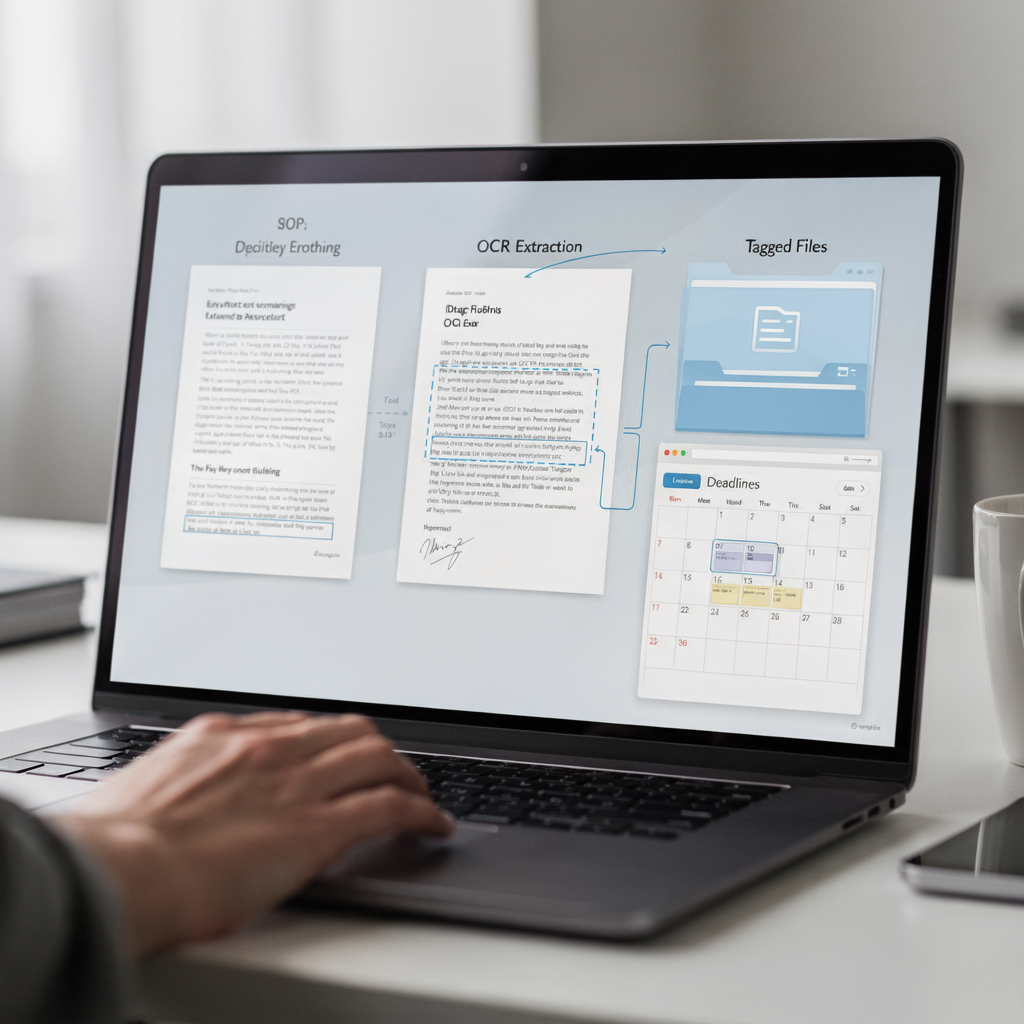
Before AI, transaction document flows were manual and slow. Agents uploaded PDFs. TCs pulled data into spreadsheets. Teams emailed back and forth and lost time. After AI, document ingestion happens automatically. The system OCRs a PDF and extracts contract data. Then it tags and stores documents in version-controlled folders. This flow reduces errors and saves time.
Concrete steps look like this. First, ingest a PDF or scanned purchase agreements. Next, OCR the file and extract key details such as appraisal dates, inspection report items, and contingency windows. Then, tag the file and sync the extracted contract data to the CRM. Finally, push a PDF and a summary to the broker’s compliance folder and update the to-do list. This short workflow changes how teams manage transactions.
Document management and data extraction are high-impact areas for time savings and fewer mistakes. SkySlope works as a transaction platform, and AI layers on top to handle smart parsing and version control. For teams that need automated logistics-style email drafting and structured outputs, check our automated logistics correspondence page automated logistics correspondence. The system can extract key details and create a spreadsheet row for each deal-related item.
Use cases include extracting inspection report items, filling forms, and creating a task list for tc’s. AI can detect missing signatures and attach a compliant audit trail. It also helps to organize documents by type so the back office can find files fast. When the AI extracts a date, it adds the date to Google Calendar and the transaction timeline. That reduces missed deadline events and cuts manual data entry. This architecture is built specifically for real operations and can save you time on every transaction.
Drowning in emails?
Here’s your way out
Save hours every day as AI Agents label and draft emails directly in Outlook or Gmail, giving your team more time to focus on high-value work.
workflow, ai-powered transaction, ai agent: Building ai-powered transaction workflows that integrate with Follow Up Boss and Skyslope in real-time
Integrations keep agents, clients, and tcs aligned. An AI agent watches for triggers. It then creates tasks, sends notifications, and updates records. This real-time sync cuts hand-offs and reduces followup gaps.
Start with CRM sync. For example, when a new lead converts in Follow Up Boss, the system triggers transaction creation and pushes basic transaction details. Then, AI completes the next steps: fetch contract files, run intelligent contract analysis to team, and populate the compliance folder. When Skyslope receives a new document, the AI verifies signatures and posts a status update. Together, these integrations create a continuous, real-time loop that keeps everyone informed.
Technical examples include webhooks from Follow Up Boss that call an endpoint to create a new transaction. A sample payload might include buyer, seller, and pdf links. The AI agent then calls the Skyslope API to upload the pdf and attach extracted fields. For testing, use a simple checklist: confirm webhook delivery, validate field mapping, test error handling, and confirm status updates appear in the CRM. This checklist helps avoid basic integration gaps.
Choose vendors that offer stable APIs and role-based access. Also, validate that the workflow updates the task list and sends followup notifications to the right inboxes. For CRM-centric teams, ensure the sync includes transaction creation and contract data. This preserves each transaction detail and ensures your tc can stay organized. If you want ideas for automating email drafting across operations and CRM, read about our ERP email automation work ERP email automation for logistics.
When selecting an ai-powered platform, make sure it supports both Follow Up Boss and Skyslope. Then test notifications, to-dos, and escalation rules. Real estate agents and brokers see clear benefits. They get fewer manual hand-offs and more time to sell. The setup does require initial mapping, but once complete the workflow delivers consistent updates and reduces time spent in email chains and inboxes.
transaction coordination, deadline, closing, broker, tcs: Reducing missed deadlines and speeding closing with smart automation for brokers, tcs and real estate agents
Missed deadlines raise legal risk and slow closing. Smart automation monitors timelines and sends alerts before a date hits. It also escalates when tasks age. This protects brokers and improves outcomes at closing.
Automated deadline monitoring watches contingency windows and milestone dates. It then sends reminders to the assigned TC and the broker. If a task is overdue, the system escalates to a backup owner. You can set escalation paths by role-based rules, and link reminders to Google Calendar entries. This reduces missed dates and keeps the deal on track.
Metrics matter. In related industries, AI support raised productivity by about 15% on average Generative AI at Work – Oxford Academic. Also, many firms have started AI pilots while few have fully rolled out programs V7 Go: Best AI Tools for Real Estate. Use these numbers as context when you model time savings and hours back for your team.
Here is an escalation playbook for exceptions. First, notify the primary tc immediately when a deadline is at risk. Second, alert the broker if the task stays open after a set window. Third, create a red-flag report for compliance. Fourth, route critical items to an on-call person. This simple playbook turns alerts into action and prevents slowdowns at closing.
AI can also surface high-risk clauses in purchase agreements and flag missing contract data. The AI highlights unusual terms and compiles a short summary for human review. Then a transaction coordinator reviews and signs off. This human+AI loop keeps deals compliant and moving toward a faster closing. For brokerages that want to measure adoption and ROI, see our analysis of AI impact on operations virtualworkforce.ai ROI analysis.

Drowning in emails?
Here’s your way out
Save hours every day as AI Agents label and draft emails directly in Outlook or Gmail, giving your team more time to focus on high-value work.
ai-powered transaction coordination, ai-powered transaction management, ai transaction: Compliance, audits and the human+AI workflow for safe transaction management
AI supports compliance with immutable logs and audit trails. It records every upload, every change, and every notification. This record helps brokers show compliant processes during audits. Still, a human must make final calls on sensitive items. The AI flags risks and the tc intervenes.
Design governance to include approval gates. Have an approvals policy that specifies when AI can auto-complete tasks and when a human must sign off. Keep monthly audit exports ready for review. Include role-based permissions to limit who can change compliance fields. This reduces errors and preserves a clear chain of custody for every contract detail.
AI can generate red-flag reports for missing signatures or conflicting contract data. For example, it can scan the contract and find inconsistent dates between purchase agreements and the appraisal timeline. The report then auto-notifies the tc and the broker. This allows a fast fix and keeps the transaction aligned with regulatory expectations.
For safe deployment, follow these short steps. First, identify the fields the AI will extract. Second, train the model on a sample set of documents. Third, set thresholds for confidence scores. Fourth, route low-confidence items to human review. Fifth, store a summary and a PDF of the original file for audits. This ensures that every audit has a clear summary and a linked source document.
Remember that AI helps with compliance checks but does not replace human sign-off. Keep immutable logs and require the tc to confirm final status before closing. This hybrid approach keeps the process compliant and fast. If you need systems that automate email lifecycles and ground replies in operational data, see how our virtual assistant approach reduces handling time and increases consistency how to scale operations with AI agents.
real estate business, real estate workflows, ai tools, seamless: Measuring ROI and choosing the right ai-powered transaction management platform for your real estate business
Pick a platform by scoring five categories. First, integration and API support. Second, document automation and data extraction accuracy. Third, deadline engine and audit logs. Fourth, user experience and onboarding time. Fifth, vendor support and pricing. This simple rubric helps you compare options and measure ROI.
When you evaluate platforms, include transaction management software and real estate transaction management software in your comparison. Check whether the vendor supports real estate transaction management and whether the product is built specifically for real operations. Also confirm that it can sync with Follow Up Boss and Skyslope. Integration readiness matters for smooth adoption.
Consider a decision checklist before you pilot. Verify scale, integrations, real-time updates, extraction accuracy, and price. Also ask about a free plan, onboarding timelines, and training. Test sample files, such as PDFs of purchase agreements, inspection reports, and appraisal documents. Measure extraction accuracy and time savings on those samples. This gives you actionable metrics to compare vendors and to choose the right ai-powered platform.
Track KPIs during your 30/60/90-day adoption plan. In the first 30 days, focus on installation, mapping fields, and basic sync. In the next 30 days, expand to deadline alerts, task automation, and daily followup rules. In the final 30 days, measure time saved per transaction and error rate improvements, and refine escalation paths. Use metrics such as hours back per week, percent reduction in manual data entry, and faster time-to-close to justify the investment.
Finally, include operational items like CRM sync and role-based access. If your firm uses a paperless pipeline, ensure the platform can organize documents, export summaries, and produce PDF audit packs. The right platform will help coordinators work faster and help real estate agents close deals faster. For teams focused on email automation and accurate replies grounded in operational data, explore our best tools and guides best tools for logistics communication.
FAQ
What is an AI-powered transaction coordinator?
An AI-powered transaction coordinator uses machine learning to automate routine, data-driven tasks in a real estate transaction. It handles actions like document parsing, deadline reminders, and drafting templated messages while a human oversees exceptions.
Will AI replace transaction coordinators?
No. AI reduces repetitive work and increases accuracy, but humans retain final sign-off and handle complex negotiations. The expected outcome is a human+AI workflow that improves capacity and speeds closing.
How does AI extract data from contracts?
AI uses OCR and named-entity recognition to extract key fields such as dates, names, and contingency clauses. The system then populates structured records and flags low-confidence items for human review.
Can AI tools integrate with Follow Up Boss and Skyslope?
Yes. Most modern platforms use webhooks and APIs to sync contact, transaction creation, and document status in real-time. Integrations reduce hand-offs and keep the CRM and compliance platform aligned.
What metrics should I track to measure ROI?
Track time saved per transaction, reduction in manual data entry, error rate, and time-to-close improvements. Also measure hours back for coordinators and the percent of tasks automated.
How does AI handle compliance and audits?
AI maintains immutable logs and stores original PDFs alongside extracted summaries. It can generate monthly audit exports and red-flag reports for broker review to keep files compliant.
Is there a risk of AI making incorrect decisions?
Yes. AI can make mistakes when confidence is low or documents deviate from training data. For that reason, set thresholds that route uncertain items to a human for final review.
Can small brokerages and solo agents use AI?
Yes. Solutions scale from solo agent workflows to enterprise operations. Small teams often benefit from faster turnarounds and better organization, which help them close deals faster.
What initial setup is required for integration testing?
You should validate webhook delivery, field mappings, status updates, and escalation rules. Also test sample PDFs like purchase agreements, inspection reports, and appraisal documents to confirm extraction accuracy.
Where can I learn more about automating email workflows in operations?
virtualworkforce.ai publishes guides on automating operational email and how to scale without hiring. For hands-on examples of AI-driven email automation, see our guides on automated logistics correspondence and virtual assistant logistics.
Drowning in emails?
Here’s your way out
Save hours every day as AI Agents label and draft emails directly in Outlook or Gmail, giving your team more time to focus on high-value work.