


ai recruiting tool — What an ai recruiting tool does and why recruitment agencies use it
An AI recruiting tool is software that helps recruitment teams find, sort and engage candidates. It can source CVs, parse resumes, score applicants, schedule interviews and run outreach. Recruiters use these tools to reduce repetitive work and to focus on people rather than paperwork.
AI can screen thousands of resumes in minutes. That means time saved and faster decisions. Agencies report average time‑to‑hire reductions of around 25–30% when they adopt AI in key steps of the hiring funnel. For example, 70% of organisations have moved from pilots to wider AI rollouts in hiring projects, showing real momentum across the industry (Mordor Intelligence).
Candidate engagement also improves. Teams using AI messaging and outreach report response uplifts in double digits. One study links AI‑assisted messaging to a roughly 9% higher recruiter response rate in candidate outreach (LinkedIn). Other tools push that gain higher depending on workflow design.
Common examples include sourcing platforms such as hireEZ, engagement tools like Gem, and ATS options such as Manatal and Workable. Job copy and inclusive language tools such as Textio help improve the job post and the job description. Most AI tools plug into ATS systems such as Bullhorn, Greenhouse and Lever. These integrations matter because they keep data flowing and reduce manual updates.
Agencies pick AI recruiting to scale. They want to source more candidates, move faster and improve outreach without hiring extra staff. Short, clear rules help teams adopt technology. Start with one use case. For example, automate first‑pass CV screening, and then add outreach automation. That approach keeps risk low and value high.
This chapter uses common terms so non‑technical teams can act. If you want deeper logistics email automation examples that mirror recruitment automation patterns, see our guide on scaling operations without extra hires how to scale logistics operations without hiring.
automate and ai recruiting software — Build a workflow that automates sourcing, screening and scheduling
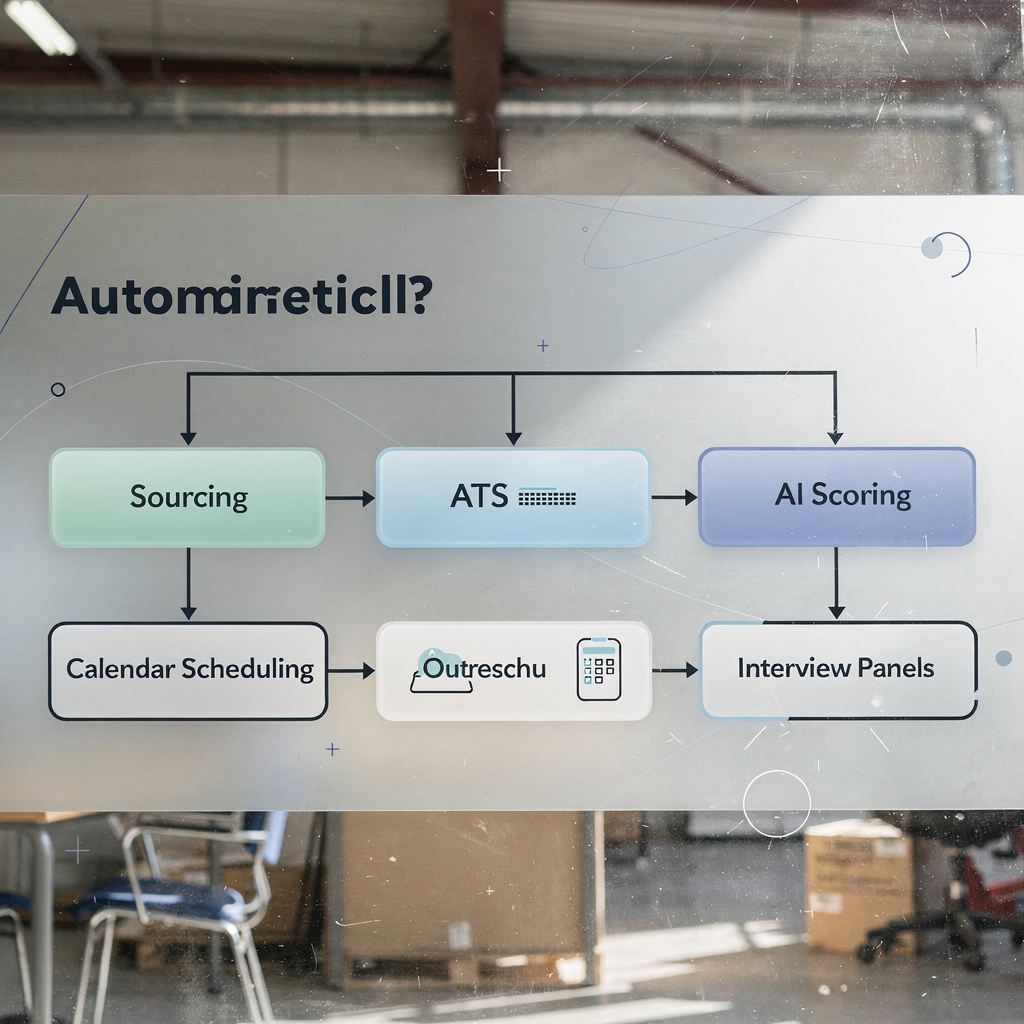
Start with a clear workflow. A simple sequence works best. Step 1: talent search. Step 2: candidate scoring. Step 3: outreach. Step 4: interview scheduling. Step 5: evaluate outcomes. Repeat and refine. This stepwise design lets teams automate quickly and safely.
Many teams use an AI recruiting software stack that combines sourcing tools, an ATS, a calendar integration and a candidate chatbot. A suggested diagram would show arrows from sourcing to ATS to calendar and then back to scoring. That visual makes handovers obvious.
At scale, AI can screen thousands of CVs automatically and produce ranked shortlists. Screening volume rises without more staff. One reported improvement is ~38% better alignment between shortlisted candidates and role needs when AI scoring complements human review (research). Automated scheduling cuts admin hours and reduces late cancellations.
Here is a practical workflow to automate right now. First, run a sourcing boolean query in a sourcing tool or AI sourcing tool. Then, sync candidates to your ATS. Next, launch an automated first‑stage video interview using an AI video interview tool and an auto‑score engine. Finally, send calendared interview invites and follow‑up outreach. This sequence helps you automate sourcing, screening and scheduling without complex builds.
Calendar and comms integrations are essential. Link your CRM, email and calendar so invites and reminders flow automatically. Use conversational AI chatbots for initial candidate questions. Use ai scoring to prioritise profiles, but keep human checks in place.
A small case study: a mid‑sized agency adopted ai recruiting software for high‑volume hiring roles and reduced admin time by about 30%. They automated outreach, scheduling and initial scoring. The agency then focused recruiter time on interviews and offer negotiation.
Drowning in emails?
Here’s your way out
Save hours every day as AI Agents label and draft emails directly in Outlook or Gmail, giving your team more time to focus on high-value work.
recruiter and recruit — Where recruiters add value when AI handles routine tasks
When AI handles routine tasks, recruiters shift to relationship work and judgement tasks. AI takes the repetitive parts. Human recruiters focus on assessment, culture fit, negotiation and closing. Recruiters add the empathy and context AI cannot provide.
AI helps shortlist, but human decisions remain critical. Firms that combine AI with human oversight report better fairness and fewer errors. Human review reduces bias and catches edge cases that models miss (BSR). Treat AI scoring as one input, not the final say.
Clear handover points improve workflows. For example, set the threshold where AI passes candidates to a recruiter for a phone screen. Train interviewers to read AI notes and to validate model flags. Provide checklists for interviewer behaviour, such as standardised questions and score anchors. These steps improve consistency and make decisions defensible.
Practical tips for recruiter handovers: document when AI should route a candidate, show the source data behind the score, require shortlist sign‑off by a recruiter and track amendments. Use short training sessions to teach recruiters how to read AI explanations and how to challenge them.
Recruiting agencies should also protect candidate experience. Even when outreach is automated, personalise follow ups and add human touches before interviews. That approach raises acceptance rates and reduces ghosting.
One role for an AI recruiter is to surface candidates who meet both skills and soft‑signal markers. Use that surface to speed screening, and then let a recruiter decide. If you manage operational email workflows similarly, our work on automating logistics email drafting shows how AI and people can split work while keeping audit trails automated logistics correspondence.
talent acquisition and staff — Measure outcomes: hire quality, speed and staff retention
Measure impact with clear KPIs. The main fields to track are time‑to‑hire, cost‑per‑hire, quality‑of‑hire, offer acceptance and retention at 3, 6 and 12 months. Track diversity and adverse impact too. Good measurement shows whether AI helps or harms your long‑term goals.
Expected improvements are meaningful. Time‑to‑hire often falls by 25–30% after AI adoption. Cost savings can reach about 30% in some workflows when automation reduces repetitive admin. Candidate fit and matching rates can improve by roughly 38% when predictive analytics guide selection (research). Use these as planning targets, not guarantees.
How to track. First, set a baseline for each KPI. Second, run an A/B test on similar roles—one using the new AI workflow and one using the older workflow. Third, monitor hiring analytics and talent intelligence dashboards weekly at first, then monthly. Include a diversity dashboard to detect adverse impact early.
A sample KPI dashboard should show time‑to‑offer, interview‑to‑offer ratio, cost‑per‑hire, candidate NPS and retention percentages at key milestones. Report cadence matters. Share quick weekly snapshots with recruiting leads and a full monthly review with talent acquisition managers and hiring managers.
For agencies focusing on staff and operations, data grounding matters. If your roles link to operational teams, consider integrating with systems that track role outcomes. For logistics or freight roles, our ERP email automation work shows how structured data from messages helps measure service outcomes and candidate fit ERP email automation for logistics.
Finally, keep KPIs simple at first. Choose three primary metrics. Improve them steadily with clear ownership and short feedback loops.
Drowning in emails?
Here’s your way out
Save hours every day as AI Agents label and draft emails directly in Outlook or Gmail, giving your team more time to focus on high-value work.
ai recruitment and ai recruiter — Risks, ethics and compliance for the ai recruiter
AI adds power and risks. Key risks include bias, poor transparency, privacy gaps and uncertain explainability. Regulation is changing fast. Disclose automated decision‑making where required and follow data protection rules such as GDPR. The EU AI Act and similar rules require governance for higher‑risk systems.
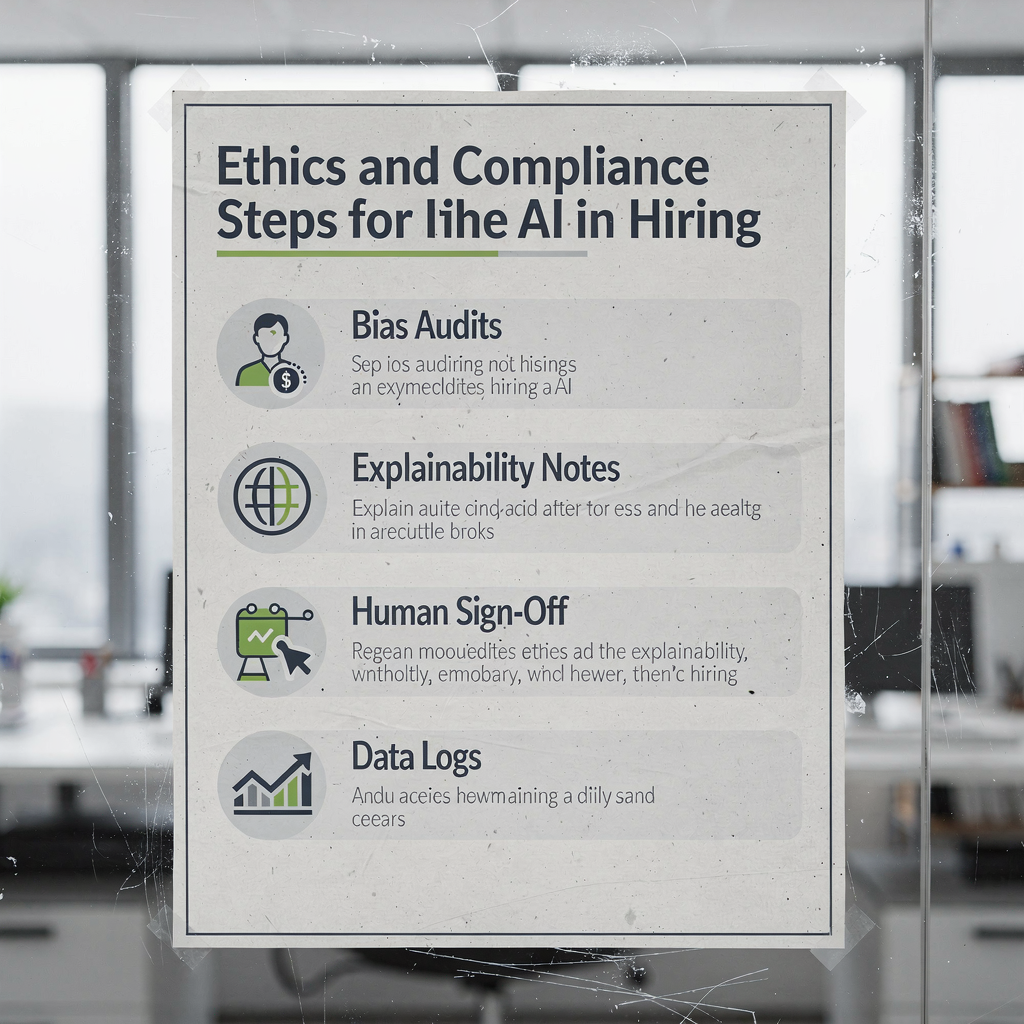
Good practice starts with bias audits. Run dataset checks and test model decisions across protected groups. Keep logs of training data, model versions and decision reasons. If a model rejects candidates for high‑risk roles, require a human sign‑off before the reject stands.
Action checklist: run dataset bias checks, maintain explainability notes for each model, require human sign‑off on rejects for critical roles, and document automated steps in the recruitment process. Keep candidate consent records and be ready to show why a decision was made.
Transparency helps. Provide candidates with simple explanations of automated steps. Offer a human contact when decisions affect a candidate materially. These small steps improve trust and reduce complaints.
Operational controls matter too. Limit access to model outputs, and use role‑based controls in your ai recruiting platform. Keep audit trails so you can trace a score back to inputs. Regularly test models in production and update training data when drift appears.
Finally, coordinate with legal and HR. Establish an internal review for any new ai recruitment tool. If you need practical examples of traceable automation in operational email flows, see our comparison of virtual assistants for logistics that focuses on explainability and governance virtual assistant logistics.
best ai recruiting tools and ai recruiting platform — Choosing and rolling out the best ai recruiting tools for your agency
Choose tools by five core criteria. First, accuracy: does the tool surface relevant candidates? Second, integrations: can it plug into your ATS, CRM and calendar? Third, explainability: can the vendor show how scores are made? Fourth, security and privacy: can the vendor meet your compliance needs? Fifth, vendor support and pricing.
Start small. Pilot with a narrow set of roles and measure clear KPIs. Then scale to more roles and to full recruiting agency pipelines. A simple 90‑day rollout plan works well: 30 days to pilot, 30 days to measure and adapt, 30 days to expand and train.
Short vendor shortlist. For sourcing use hireEZ and Promap. For pipeline and engagement use Gem and Juicebox. For ATS and automation consider Workable and Manatal. For job copy use Textio. These tools cover sourcing capabilities, outreach, candidate sourcing and CRM flows. Most integrate with major ATS and with calendar systems.
Selection checklist: run a proof of concept, test candidate sourcing accuracy, confirm ATS and CRM integrations, validate security controls, test explainability features, check vendor SLAs, and estimate total cost of ownership. Add one field: how the tool supports outreach personalization.
Rollout roadmap: day 0–30 pilot two roles and train two in‑house recruiters. Day 31–60 run A/B tests and measure time‑to‑hire, cost‑per‑hire and candidate NPS. Day 61–90 scale to more roles and add training sessions for hiring managers and interviewers. Capture lessons and update SLAs with stakeholders.
One practical note: many agencies combine third‑party tools like hireEZ with their ATS. That mix can speed time to value. If your agency handles operational emails alongside recruitment comms, consider how an AI agent can reduce inbox load and keep outreach consistent; learn how we automate email lifecycle for ops teams in logistics to see similar vendor selection trade‑offs how to scale logistics operations with AI agents.
FAQ
What is an AI recruiting tool and how does it help agencies?
An AI recruiting tool is software that automates candidate sourcing, screening and engagement tasks. It helps agencies handle larger volumes, reduce admin and focus recruiter time on interviews and offers.
Can AI reduce time‑to‑hire and by how much?
Yes. Many agencies see time‑to‑hire reductions of about 25–30% when they automate screening and scheduling. Results vary by role and by how the workflow integrates with existing systems.
Are AI scores reliable for shortlisting candidates?
AI scores can improve shortlisting accuracy, especially when combined with human review. Use scores as an input and validate them with structured interviews to maintain fairness.
How should recruiters work with AI in the workflow?
Recruiters should focus on relationship work, assessment and closing. Let AI handle initial sourcing, parsing and outreach, and then step in at set handover points for human judgement.
What KPIs should talent acquisition teams track?
Track time‑to‑hire, cost‑per‑hire, quality‑of‑hire, offer acceptance and retention at 3/6/12 months. Also monitor diversity and adverse impact metrics to ensure fair hiring.
What are the main ethical risks of using AI in recruitment?
Key risks include bias, lack of transparency and data privacy issues. Best practice is to run bias audits, keep explainability notes and require human sign‑off on important rejects.
Which integrations matter when choosing an AI recruiting platform?
Integrations with your ATS, CRM, email and calendar are essential. Also check whether the platform supports data export for hiring analytics and talent intelligence dashboards.
How quickly can an agency pilot AI recruiting software?
A focused pilot can run in 30 days for a couple of roles. Use that period to test sourcing accuracy, outreach response rates and scheduling automation before scaling.
Do I need an ai recruiter role in my team?
Not always. Many teams upskill existing recruiters to read AI outputs. However, some agencies hire an AI champion or ai professionals to manage models and vendor relationships.
Where can I see examples of AI automating operational messages similar to recruitment outreach?
Virtualworkforce.ai publishes case studies on automating inbox workflows for logistics and operations teams. See resources on automated logistics correspondence and ERP email automation for examples of end‑to‑end automation and traceability automated logistics correspondence, ERP email automation for logistics.
Drowning in emails?
Here’s your way out
Save hours every day as AI Agents label and draft emails directly in Outlook or Gmail, giving your team more time to focus on high-value work.